What Happens to Your Analytics When Your Website Gets Redesigned
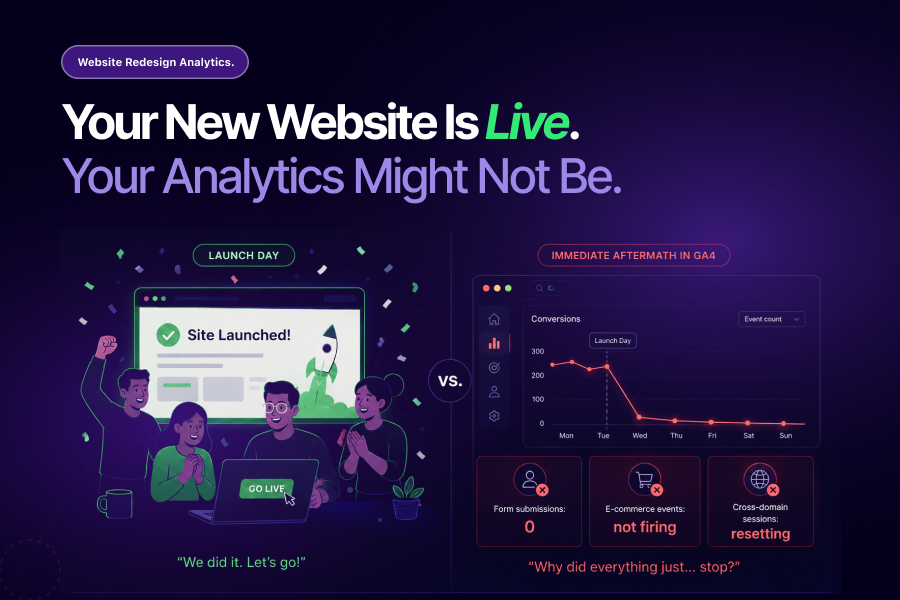
A website redesign is one of the most celebrated moments in any digital team’s calendar. Months of work, new design, improved UX, faster load times, and a launch day that everyone has been counting down to. What rarely makes it onto the launch day checklist: a comprehensive plan for what happens to your GA4 data when the new site goes live.
Website redesign analytics failures are the most predictable type of tracking failure in digital measurement. They happen on a regular cycle, they follow the same patterns every time, and they are rarely caught until after the damage is done.
This blog covers exactly what breaks, why it goes undetected, and what a proactive website redesign analytics plan looks like before, during, and after launch.
Why Website Redesigns Hit Analytics Harder Than Anything Else
According to Gartner research cited by HubSpot, 71% of marketing leaders redesign their websites every one to three years. For most businesses, a redesign is not a rare event. It is a regular part of the digital calendar.
And yet, most redesigns treat analytics as an afterthought rather than a core workstream. Teams launch under pressure, cutting corners and skipping the validation steps that website redesign analytics depends on.
Here is what makes a redesign uniquely dangerous for GA4 data:
- Every page URL may change, breaking historical traffic data continuity
- New page structures invalidate existing GTM triggers and event configurations
- Updated CSS classes and button IDs break click tracking that relied on the old code
- Redirects strip UTM parameters, disrupting campaign attribution
- New checkout flows and form designs require conversion tracking to be rebuilt from scratch
- Staging environments rarely match production, so QA on staging misses production-specific failures
Each of these is a website redesign analytics risk that can exist silently for weeks after launch. None of them announce themselves in your GA4 dashboard. Your reports still populate. Your dashboards still update. The numbers are just wrong.
The Five Things That Break Most Often
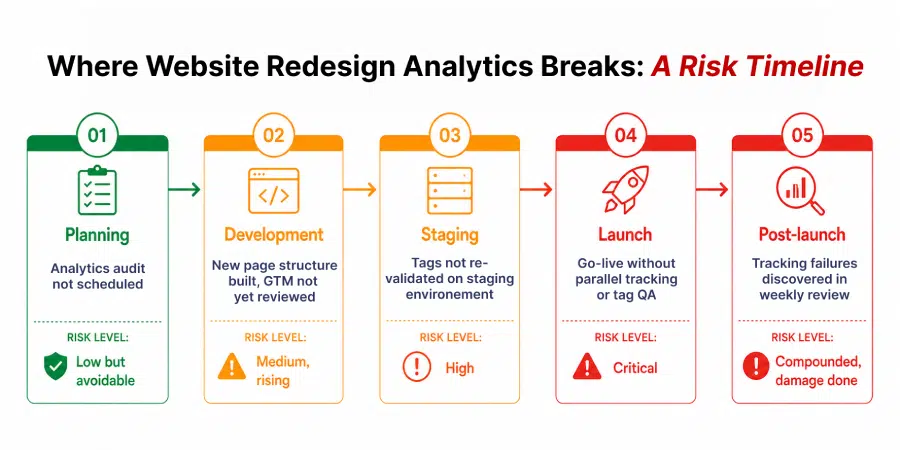
Understanding where website redesign analytics fails most predictably is the first step toward preventing it.
1. Conversion Event Tracking
This is the highest-risk area in any redesign. Conversion events in GA4 are triggered by specific user actions: form submissions, button clicks, purchase completions, file downloads. When a redesign changes the structure of the page those events sit on, the triggers that fire them often stop working.
A “Contact Us” form that previously triggered a GA4 event on submission now uses a different form library after the redesign. The old GTM trigger looks for the previous form ID. The new form loads differently. The conversion event stops firing. GA4 records zero form submissions. The marketing team assumes campaign performance has dropped. Budget decisions follow.
2. GTM Container Conflicts
Most websites accumulate GTM tags over time. A redesign is often treated as a clean slate for the site but not for the GTM container that runs on it. Old tags left in the container, triggers pointing to page elements that no longer exist, and variables that reference deprecated code all create conflicts that degrade website redesign analytics reliability without any single obvious failure point.
Tatvic’s AI-powered GTM health monitoring specifically addresses this layer, auditing container health continuously rather than waiting for an annual cleanup to surface the same issues.
3. URL Structure Changes Breaking Historical Data
A redesign often consolidates, restructures, or renames URL paths. When this happens without careful redirect mapping, old URLs return 404 errors or redirect incorrectly. GA4’s historical data for those pages becomes disconnected from the new URL structure. Year-over-year comparisons break. Landing page performance reports become unreliable. Attribution for organic traffic is disrupted.
This is one of the most common website redesign analytics failures and one of the most underestimated in its downstream impact.
4. Cross-Domain and Subdomain Tracking Gaps
Many redesigns involve structural changes to how domains and subdomains are organized. A new checkout experience on a subdomain, a migrated blog, or a consolidated domain structure all require cross-domain tracking in GA4 to be reconfigured.
When it is not, sessions reset at domain boundaries. Users who move from the main site to a checkout subdomain appear to arrive at the checkout as direct traffic, breaking the attribution chain that links the original campaign to the eventual conversion.
5. Enhanced E-commerce Tracking Failures
For e-commerce businesses, a redesign that updates the checkout flow almost always requires enhanced e-commerce tracking to be rebuilt. Product views, add-to-cart events, checkout steps, and purchase events all depend on the specific structure of the checkout pages they sit on.
When those pages change, the data layer schema often changes with them. Revenue tracking breaks. Product performance data disappears. The business makes merchandising and campaign decisions on an incomplete picture.
Planning a website redesign and want to make sure your GA4 setup survives it?
Talk to Tatvic’s analytics team before your redesign begins, not after it launches.
Why Website Redesign Analytics Failures Stay Hidden
This is the question that most teams ask in retrospect: how did we not catch this sooner?
The answer is structural. Website redesign analytics failures share the same characteristics that make all silent data failures so expensive:
- The reports still populate, just with wrong data
- The numbers look plausible, just slightly different from before
- The natural assumption is that any change is due to the new site, not broken tracking
- The development team considers the launch successful if the site works
- The analytics team is not always in the launch room
Redesigns also happen under pressure. When timelines slip, the last things cut are always the ones that are not immediately visible: QA processes, parallel tracking periods, and post-launch validation. These are also the things that website redesign analytics depends on most.
What Proactive Website Redesign Analytics Looks Like
A proactive approach to website redesign analytics is not a post-launch audit. It starts before the first wireframe is approved.
Before the redesign begins:
GA4 audit. Document every event, every trigger, every conversion in your current setup. Know exactly what you are protecting before you change anything. This audit becomes the baseline that post-launch validation is measured against. Data sanity automation can run this baseline automatically, creating a documented record of expected event behaviour before the redesign begins.
During development:
Rebuild tracking in parallel. Do not wait until the new site is live to think about GA4. Rebuild your event tracking, GTM configuration, and conversion events in the staging environment. Validate every conversion event against the new page structure before launch day. Treat tracking validation as a go-live requirement, not a post-launch task.
At launch:
Run parallel tracking. For a defined period after launch (ideally two to four weeks), run your old and new tracking configurations simultaneously where possible. This gives you a data quality comparison that identifies gaps the moment they appear rather than weeks later.
Post-launch:
Reset anomaly detection baselines. A new site design will naturally change engagement patterns. Bounce rates, session durations, and conversion rates may all shift legitimately. Reset your anomaly detection baselines after launch so that genuine post-redesign behaviour changes do not trigger false alerts, and so that real tracking failures are not masked by expected metric movements.
Ongoing:
Maintain a response playbook for tracking failures. As covered in An Alert Without a Playbook Is Just Noise, an alert without an owner and a response process is decorative. Define who owns tracking failures post-launch, what the response SLA is, and what the escalation path is when a conversion event goes silent.
The Pre-Launch Analytics Checklist
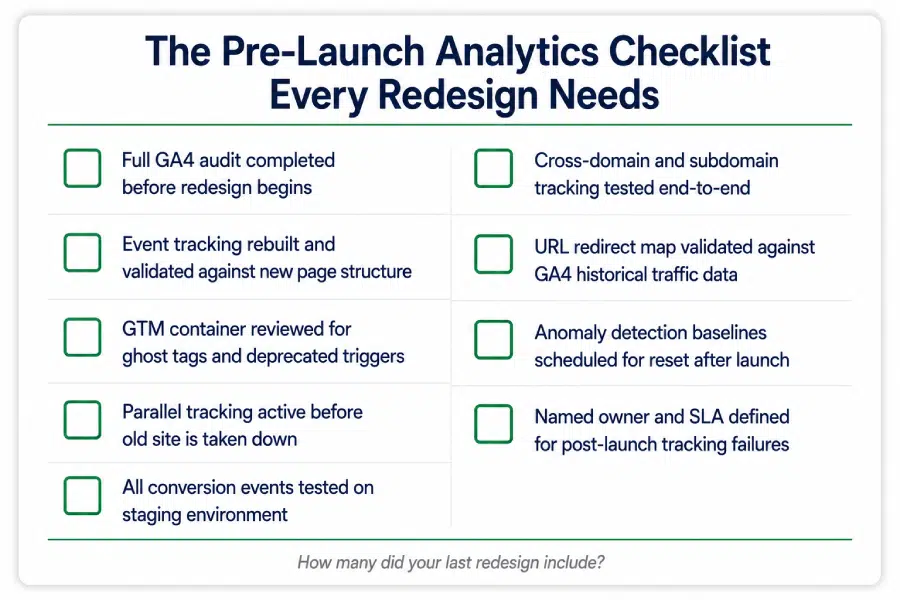
Before any redesigned site goes live, run through this:
- Full GA4 audit completed and documented before redesign begins
- Event tracking rebuilt and validated against the new page structure
- GTM container reviewed for ghost tags, conflicts, and deprecated triggers
- Parallel tracking active before the old site is taken down
- All conversion events tested on the staging environment, not just the live site
- Cross-domain and subdomain tracking reconfigured and tested end-to-end
- URL redirect map validated against GA4 historical traffic data
- Anomaly detection baselines scheduled for reset after launch
- Named owner and response SLA defined for post-launch tracking failures
A redesign that launches without this checklist is not launching with confidence. It is launching with an unknown number of silent tracking failures waiting to be discovered.
The Takeaway
Website redesign analytics failures are not bad luck. They are the predictable outcome of treating analytics as a post-launch consideration rather than a launch requirement.
The Forrester research on UX investment found that a seamless experience can boost conversion rates by up to 400%. A redesign that improves UX but breaks conversion tracking measures none of that improvement.
The businesses that get website redesign analytics right are not the ones with the most technical analytics teams. They are the ones that treat tracking validation with the same rigour as design QA, development QA, and performance testing. Because all of those only tell you whether the site works. Analytics tells you whether the decisions made from the site’s data can be trusted.
Already launched a redesigned site and not sure if your GA4 tracking is intact?
Tatvic’s team can run a full post-launch analytics audit across your event tracking, GTM configuration, and conversion events and tell you exactly what broke and what it has cost you. Schedule a call with Tatvic’s experts today.