

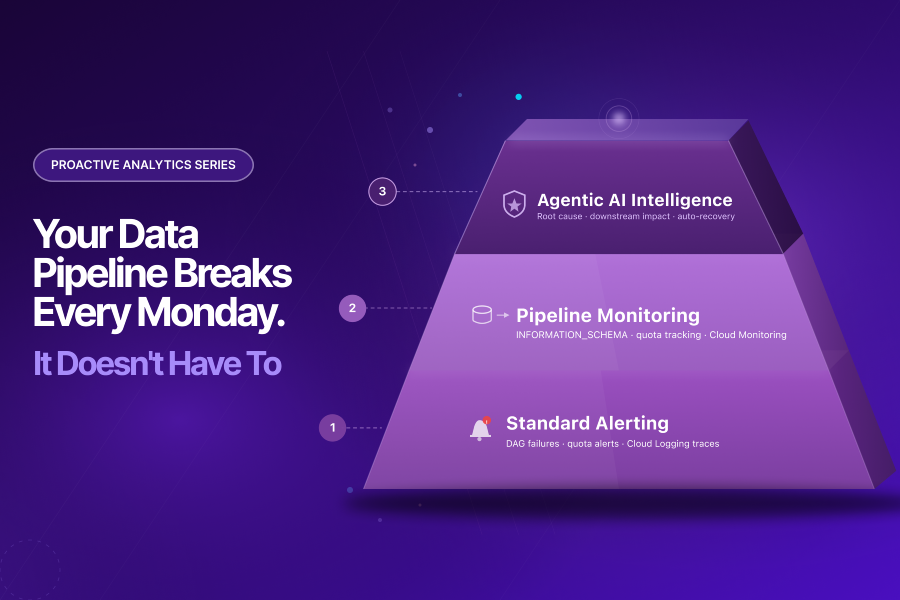
Your Data Pipeline Breaks Every Monday. It Doesn’t Have To.
Priya had done everything right.
She had spent Friday evening double-checking the weekend pipeline schedule. Jobs were queued. Refresh windows were set.
A marketing report was due Monday morning at 9 AM – one that the CMO would open in a client review meeting at 9:30.
By Saturday night, her BigQuery pipeline was running exactly as planned.
Come Sunday morning, it had quietly failed. And nobody knew.
Monday arrived. Priya’s phone lit up at 8:47 AM.
The dashboard was blank. But the real problem was not the dashboard.
The CMO had a budget reallocation discussion at 9:30 AM. Media teams were preparing spend decisions. Regional teams were waiting on performance trends before launching campaigns.
Nobody knew the numbers were wrong.
That is what makes BigQuery pipeline failures dangerous. They do not just break reports. They quietly break business decisions.
What followed was a familiar scramble – engineers pulled into a thread, logs opened in four browser tabs, Slack messages flying.
Forty minutes of senior data engineer time, burned on diagnosis before the business day had properly begun.
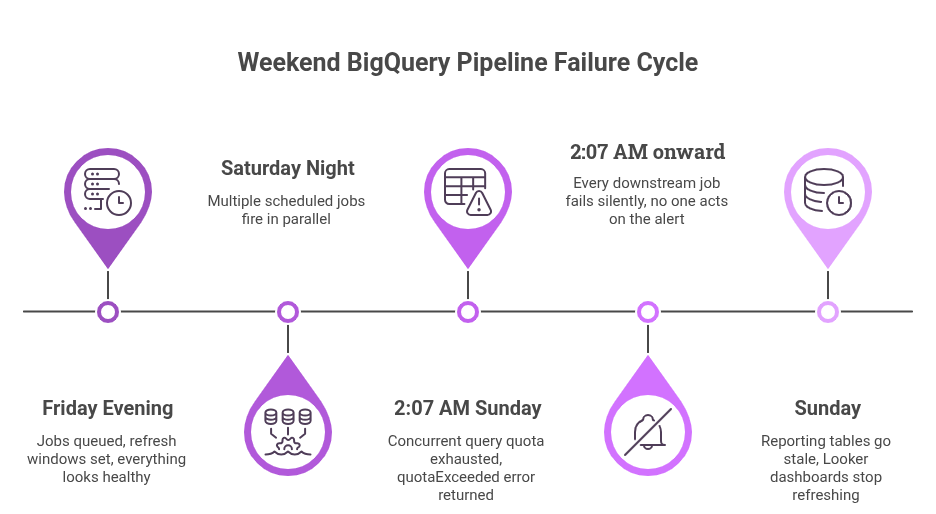
The cause? A BigQuery quota limit had been hit at 2 AM Sunday. Parallel scheduled jobs had exhausted the project’s concurrent query quota.
Every job that ran after that point failed silently. No alert was sent that anyone acted on. Nobody noticed until Priya opened a blank dashboard.
This is not a one-off. According to Monte Carlo’s State of Data Quality report, 68% of data professionals take four or more hours to even detect a pipeline incident – let alone fix it. The Monday morning fire drill is an industry pattern, not a personal failure.
BigQuery pipeline failures like the one Priya experienced are structural. Incompetent engineers or missing alerts are not the cause.
A fundamental gap between what monitoring tools report and what humans need to act – that is what drives them.
This post is about that gap – and how an AI agent closes it.
Why BigQuery Pipeline Failures Always Hit on Mondays
Data pipelines are not evenly distributed across the week. Most teams front-load heavy processing on weekends. The goal is clean, ready dashboards for Monday’s business decisions.
Weekend workloads typically include:
- Batch refreshes
- GA4 export transformations
- Looker dataset rebuilds
- Attribution recalculations and CRM sync jobs
That concentration creates a structural vulnerability
Why failures happen silently:
- Upstream systems change without notice.
- Quota limits reset or get hit overnight.
- A developer pushes a schema change Friday that breaks a downstream transformation Saturday night.
Each of these events produces a BigQuery pipeline failure. Most of them produce a failure that is entirely silent.
Cloud Composer sends an email when a DAG fails. Error traces land in Cloud Logging. But no one is reading DAG failure emails at 2 AM on a Sunday. The first human signal that something went wrong is almost always a blank cell, a wrong number, or a missing table – discovered at the worst possible moment.
That moment is always Monday morning.
The Quota Exhaustion Problem, Specifically
BigQuery enforces strict limits on concurrent queries, load jobs, and API calls per project. When a pipeline hits these limits, jobs do not queue politely. They fail.
The pattern looks like this: multiple scheduled jobs fire in parallel on Saturday night. By 2 AM, the project has exceeded its concurrent query quota.
Every subsequent job in the pipeline returns a `quotaExceeded` error and stops.
The result:
- No data flows downstream.
- Reporting tables go stale.
- Looker dashboards surface Sunday’s numbers – or nothing at all.
The infrastructure did exactly what it was designed to do. Quota exhaustion is not a bug – it is an enforced limit. What was missing was an intelligent system to catch it, diagnose it, and fix it while there was still time.
While quota exhaustion is one of the most common causes of BigQuery pipeline failures, it is rarely the only one. Schema mismatches, delayed upstream feeds, and orchestration issues often create similar downstream disruption.
What Tatvic Sees Across GA4 → BigQuery Ecosystems
At Tatvic, we work with organizations running large-scale analytics ecosystems on Google Cloud Platform – GA4 exports into BigQuery, attribution models, Looker reporting layers, campaign performance datasets, and near real-time business dashboards.
Across implementations, one pattern appears consistently:
Teams are rarely missing monitoring. They are missing interpretation.
The issue is not that alerts fail. Monitoring systems surface technical symptoms. Business teams need operational decisions.
A BigQuery pipeline failure means something very different to:
- A Data Engineer troubleshooting a quotaExceeded error at 2 AM.
- A Head of Analytics explaining a delayed report to leadership on Monday morning.
- A Marketing Director waiting on budget allocation data before launching campaigns.
This is where traditional monitoring breaks down – and where Agentic AI monitoring becomes operationally meaningful.
The Real Problem: Alerts That Nobody Can Act On
Most data teams already monitor their pipelines. That is not the issue.
Cloud Composer, the managed Apache Airflow service on GCP, surfaces DAG-level failures. Metric alerts fire from Cloud Monitoring. Some teams even have custom Pub/Sub triggers wired to Slack.
Yet BigQuery pipeline failures keep happening. Reports keep breaking. And engineers keep spending their Monday mornings on triage.
The reason is simple: an alert tells you something failed. It does not tell you why, what it affected, or what to do next.
Consider what happens after a BigQuery pipeline failure alert fires:
- Notification: An engineer receives an alert. It says “DAG failed.” That’s all.
- Diagnosis: Which task failed? Was it quota exhaustion? A schema issue? A missing GCS file? This takes 30 to 90 minutes.
- Impact assessment: Which downstream tables are stale? Which reports are affected? Which teams need to be notified?
- The fix: Often another 30 to 60 minutes after diagnosis is complete.

According to Monte Carlo’s 2023 data quality survey of 200 data professionals, the average time to resolve a BigQuery pipeline failure – once detected – is 15 hours or more. For Monday morning failures, even a fraction of that cost is unacceptable.
Alerts are not the problem. What happens after them is.
That gap is exactly what an AI agent is built to close
What an AI Agent Actually Does Differently
An AI agent monitoring your BigQuery pipeline does not replace Cloud Composer or Cloud Monitoring.
It sits on top of them – reading their signals, adding context, and turning raw BigQuery pipeline failure data into something a human can actually act on.
Here is what that looks like across four key capabilities:
1. Continuous Quota Monitoring – Before the Failure
The agent does not wait for a BigQuery pipeline failure to occur. Instead, it queries BigQuery’s INFORMATION_SCHEMA in real time to track slot usage, job queue depth, and quota consumption trends across your project.
When usage trends toward the limit, the agent intervenes automatically:
- Non-critical jobs get rescheduled to off-peak windows.
- Critical jobs get prioritized.
- The quota ceiling is never hit.
Priya’s Monday crisis would have ended here – at 1 AM Saturday, not 8:47 AM Monday.
2. Root Cause Identification – Not Just Error Logging
When a failure does happen, the agent does not log it and move on.
Cross-referencing Cloud Logging error traces, INFORMATION_SCHEMA job metadata, and DAG run history, it traces the BigQuery pipeline failure to its source.
Was it:
- Quota exhaustion?
- A schema drift upstream?
- A GCS file that never arrived?
Each failure type has a different fix. The agent identifies which one applies and surfaces it – not as a raw log, but as a structured summary with a recommended action.
3. Downstream Impact Mapping – The ‘So What’
A BigQuery pipeline failure never happens in isolation. One failed job can stale a dozen downstream tables and break three dashboards.
The agent maps these dependencies automatically and generates an impact report showing:
- Which tables are stale.
- Which reports are affected.
- Which business teams need to be informed.
The on-call engineer receives a complete picture – not a starting point for a 90-minute investigation.
4. Proactive Recovery – Fixing It Before Monday
For recoverable BigQuery pipeline failures – quota exhaustion being the most common – the agent takes action automatically:
- Failed jobs get queued for retry during off-peak windows.
- Parallel queries get staggered to avoid hitting concurrency limits.
- Data freshness is verified before Monday morning reports are generated.
The analytics manager’s Monday morning job changes. Instead of firefighting at 9 AM, she reviews a Sunday night summary – a structured digest of what ran, what was caught, what was fixed, and what is ready.
The shift is not just operational. It is a shift in trust. When data is reliable every Monday – not because engineers worked Sunday night, but because an agent handled it – data becomes something the business actually relies on.
How This Fits Into Your Existing GCP Stack
This is not a new infrastructure layer. An AI agent for BigQuery pipeline failure monitoring plugs directly into the tools GCP-based data teams already use.
It reads their outputs, enriches their signals, and closes the gap between alert and action.
| Existing System | What It Does | What the Agent Adds |
| Cloud Composer | Runs and orchestrates DAGs | Detects failure points and traces pipeline dependencies |
| BigQuery INFORMATION_SCHEMA | Provides job metadata and execution logs | Predicts quota risks and identifies failure patterns |
| Cloud Logging | Captures errors and system signals | Diagnoses root causes and prioritizes issues |
| Pub/Sub + Functions | Triggers event-based actions | Automates remediation without manual intervention |
The agent sits between your pipeline and your team. Every BigQuery pipeline failure it catches autonomously is one fewer Monday morning crisis.
In enterprise analytics environments, BigQuery pipeline failures rarely happen in isolation. One delayed transformation affects the entire downstream chain:
- Attribution reporting across channels.
- Media budget decisions in real time.
- Looker executive dashboards used in leadership reviews.
- CRM activation workflows triggered by audience data.
- Experimentation reporting for A/B test decisions.
In one environment Tatvic worked with, a failed overnight attribution refresh caused a performance marketing team to nearly pause a high-performing campaign – because conversion reporting appeared to collapse. The issue was not campaign performance. The BigQuery pipeline had silently failed.
This is why Tatvic approaches Agentic AI for data reliability differently. We do not optimize for pipeline uptime alone. We optimize for business continuity.
The Cost of Reactive BigQuery Pipeline Monitoring
The hidden cost of BigQuery pipeline failures is rarely engineering time.
It is business confidence.
When BigQuery pipeline failures reach reporting:
- Marketing teams delay campaign decisions waiting for clean data.
- Finance teams question reporting reliability in investor reviews.
- Leadership teams lose trust in dashboards they once relied on.
- Analysts spend time validating numbers instead of driving insights.
According to Monte Carlo, data teams spend 30-40% of their time handling data quality and reliability issues rather than strategic work.
For organizations making high-frequency marketing and media decisions, even a few hours of BigQuery pipeline disruption can translate into:
- Delayed campaign optimization.
- Wasted media spend on wrong attribution signals.
- Missed revenue opportunities from paused high-performing campaigns.
This is why leading organizations are increasingly treating BigQuery pipeline failure prevention as a growth enabler – not simply a technical maintenance task.
Proactive BigQuery Pipeline Failure Monitoring Is the New Baseline
Most analytics teams treat BigQuery pipeline failures as an engineering problem – set up alerts, assign on-call rotations, and respond when something breaks.
That framing is wrong, and it is expensive.
Pipeline reliability is not an engineering problem. At its core, it is a trust problem.
The analytics manager is the one sitting in the CMO’s meeting when the dashboard is wrong. Engineers built the pipeline, but the business owns the consequences when it breaks.
Agentic AI shifts the posture from reactive to proactive:
- From: “We’ll fix it when it breaks, and explain the delay later.”
- To: “We caught it over the weekend. Everything is ready for Monday.”
This is not a luxury for large data teams with dedicated reliability engineers. For any team where analytics drives business decisions, proactive BigQuery pipeline failure monitoring is the new baseline – not a nice-to-have.
Key Takeaways
- BigQuery pipeline failures typically happen over the weekend – quota exhaustion, upstream schema changes, or missed file arrivals – and surface Monday morning as wrong or missing data.
- The root cause is not missing alerts. Standard monitoring tools like Cloud Composer and Cloud Logging already fire. The gap is between alert received and root cause understood.
- According to Monte Carlo’s research, data teams spend 30 to 40 percent of their time handling BigQuery pipeline failures and data quality issues – time that should be spent on work that drives actual business value.
- An AI agent closes the alert-to-action gap by monitoring quota consumption proactively, diagnosing BigQuery pipeline failures with full context, mapping downstream impact, and recovering automatically where possible.
- Proactive BigQuery pipeline failure monitoring is not advanced. For teams where analytics powers business decisions, it is the new reliability baseline.
Still discovering pipeline failures on Monday morning?
If your dashboards are the first place your team notices data problems, there is likely a reliability gap in your analytics ecosystem.
Tatvic helps GCP-first teams proactively monitor BigQuery pipelines, diagnose failures automatically, and recover before business teams feel the disruption.
Assess Your BigQuery Reliability →