

Tracking worldpay transaction with Google Analytics & getting ecommerce data in most accurate manner is amongst one of the challenging project that we executed for one of our clients recently. I wanted this blog post to address what we all did to capture most accurate Google Analytics data possible into worldpay.
Several issues need to be addressed before proper e commerce tracking can be executed.
Here is the design how worldpay works:
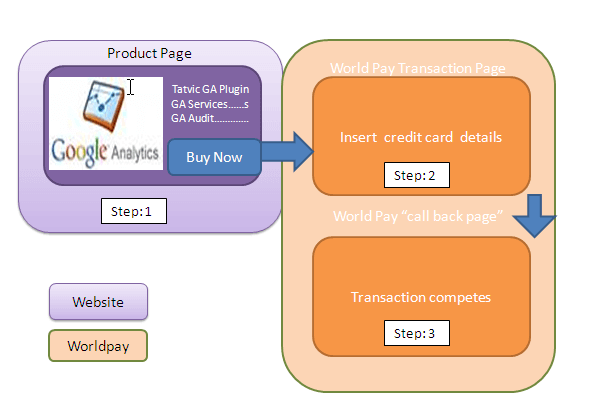
Worldpay doesnt allow javascript to be executed on their domains. So you cannot post any Google analytics code on green boxes as describe above. So technically, nothing can be tracked post step no.1 as described above.
To make this tracking work, several things needs to happen.
- We need a thank you page after worldpay transaction finishes which is on a domain where javascript can be executed. That is, we need to have one more step after (3) occurs which pushes user to move from (3) to a new page. That is the page where we can place Google analytics ecommerce tracking and track the value of transaction. Let’s call it step no.(4)

- More importantly, we need to pass all the Google analytics cookies to this thank you page ,so that the ecommerce code that gets executed on step no.4 attributes the transaction to original cookies that were present on product page or step (1).
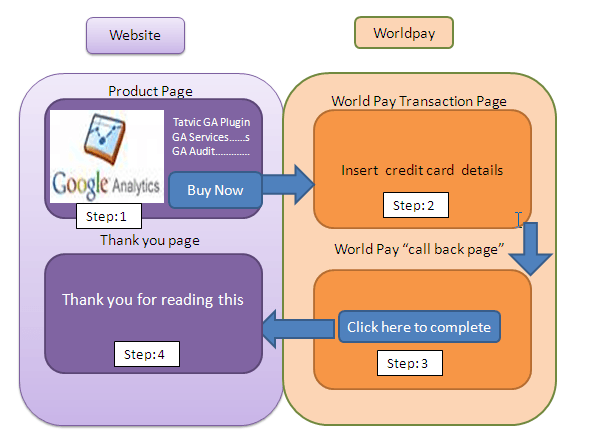
So essentially we need to have a page at step (3) that provides a button on Worldpay that says click here to finish the transaction. I will come back later as to what other things that button needs to do.
So till now , by having that button “click now to finish the transaction” ,one problem is solved so that we have one page where we can put GA code & execute the addtrans etc functions of Google Analytics.
Lets focus now on how we can pass on same cookies that existed on step (1) to step (4). Normal google analytics functions of linkbypage will not work as they can only work if the next page can fire Google Analytics.
This is where this gets really innovative.
You can get all the required cookies one by one. But, there is a simple way to get all GA cookies required at once. By using the method, pageTracker._getLinkerUrl of Google Analytics, which will give you all the cookies required along with the URL.
Now, there is a concept of hidden variable in Worldpay. Hidden variables can pass different values like price, currency, order type etc. You can create a new hidden variable and pass the Google Analytics cookies into these hidden variable.
Generally, the RBS World Pay form (where the RBS World Pay button is located and from where the users goes to RBS World Pay site for payment) looks like the following:
<form action="https://select.worldpay.com/wcc/transaction" method="post">
	<input type="hidden" name="cartId" value="Cart ID">
	<input type="hidden" name="desc" value="Product Desc">
	<input type="hidden" name="currency" value="GBP">
	<input type="hidden" name="amount" value="XX.XX">
	<input type="hidden" name="instId" value=137379>
	<input type="hidden" name="lang" value="en">
	<input type="hidden" name="subst" value="yes">
	<input type="submit" value="Order by credit/debit card" name="submit">
</form>
There are some changes that you need to make for this to work:
- The form needs to be given a name, if one is not present. This can be done by adding name=”worldpay” in the form element.
- We also need to have one custom variable defined in RBS World Pay system which will have the value of the cookies required, that can be accessed in Thank you page. Here, the defined custom variable is MC_gacookie. In this particular example, we also have one more defined custom variable MC_analytics which will have account id. This is required only when pages with different profile ids leads to same Thank you page.
With these changes, the above code of RBS world pay on product page will look like the following:
<form action="https://select.worldpay.com/wcc/transaction" method="post">
	<input name="cartId" type="hidden" value="Cart ID" />
	<input name="desc" type="hidden" value="Product Desc" />
	<input name="currency" type="hidden" value="GBP" />
	<input name="amount" type="hidden" value="XX.XX" />
	<input name="instId" type="hidden" value="”XXXXXX”" />
	<input name="lang" type="hidden" value="en" />
	<input name="subst" type="hidden" value="yes" />
	<input name="MC_analytics" type="hidden" value="XX-XXXXXX-X" />
	<input name="MC_gacookie" type="hidden" />
	<input name="submit" type="submit" value="Order by credit/debit card" />
</form>
Now, let us see what extra statements that we need to add to the normal GA tracking script on product page (or step: 1) that is generally placed at the end of the page.
The modified GA tracking script looks like the following:
<script type="text/javascript">
var gaJsHost = (("https:" == document.location.protocol) ? "https://ssl." : "http://www.");
document.write(unescape("%3Cscript src='" + gaJsHost + "google-analytics.com/ga.js' type='text/javascript'%3E%3C/script%3E"));
</script>
<script type="text/javascript">
try {
	var pageTracker = _gat._getTracker("UA-XXXXX-Y");
	pageTracker._setDomainName("none");
	pageTracker._setAllowLinker(true);
	pageTracker._setAllowHash(false);
	pageTracker._trackPageview();
	var save_url = pageTracker._getLinkerUrl("www.abc.com");
	var aPosition = save_url.indexOf("?");
	save_url = save_url.substring(aPosition + 1);
	worldpay.MC_gacookie.value = save_url;
} catch(err) {}
</script>
These additional statements are aimed to accomplish the task of saving all the required cookies as the value of the custom variable MC_gacookie that is created above.
Now, we need to store this value in a custom variable, MC_gacookie, which is specially created for this purpose. This value is accessed in the format <formname>.<variablename>.value and to this, we assign the value of required substring, save_url, obtained above. In the above example, formname is worldpay and variablename is MC_gacookie.
So by doing above, we have been able to pass the cookie values to a specific custom variable to be passed into worldpay without the need of javascript.
What is needed now is what to be done on page 3 (in worldpay’s language its called callback page). In This call back page (step: 3), we get all the variables through post methods. Just to remind that this page (or call back page or step 3) is generally a purchase completion page. Here we are changing to just have a button which says “click here to complete the transaction” button. This call back page resides on website’s server however it gets executed on worldpay.
Now this button needs to pass the values of Google analytics cookies that we had been able to pass it via a custom variable (in our example MC_gacookie) in worldpay. If you use PHP, you can use following code to get that custom variable and form a query string (don’t confuse this with GA custom variable- this is WP custom variable).
<?php $parameter = 'MC_gacookie';
if($_REQUEST[$parameter])
{
    $query="";
    //Get all existing parameters
    foreach($_REQUEST as $k => $v){
     if($k != $parameter) {
     $query=$query.$k."=".$v."&";
        }
        else
		{
        $query=$query.$v."&";
        }
    }
    $query=substr($query, 0, -1);
?>
Here $currentpage is the complete path of the thank you page. So, $currentpage can take value like http://yourwebsite.com/thankyou.html
Note: You will get a warning message when you click on the button above.
So what you have done till now is, you have passed the GA cookies till step 3 and have it as a query parameter when user clicks on the button.
The thank you page will now have the following GA e-commerce code.
<script>
var gaJsHost = (("https:" == document.location.protocol) ? "https://ssl." : "http://www.");
document.write(unescape("%3Cscript src='" + gaJsHost + "google-analytics.com/ga.js' type='text/javascript'%3E%3C/script%3E"));
<script>
var pageTracker = _gat._getTracker("UA-XXXXXX-XX"); //This needs to be set if this value is different
pageTracker._setDomainName("none")
pageTracker._setAllowLinker(true);
pageTracker._setAllowHash(false);
pageTracker._trackPageview();
pageTracker._addTrans(
	"", // order ID - required
	"", // affiliation or store name
	"", // total - required
	"", // tax
	"", // shipping
	"", // city
	"", // state or province
	"" // country
);
pageTracker._addItem(
	"", // order ID - required
	"", // SKU code (stock keeping unit)
	">?=$_GET['item_name']?>", // product name
	"", // category or variation
	"", // unit price - required
	"" // quantity - required
);
pageTracker._trackTrans();
</script>