


TL;DR
Event tracking is the foundation of modern analytics — capturing meaningful user actions beyond pageviews. In 2026, understanding the difference between interactive events (user-initiated actions such as clicks or form submissions) and non-interactive events (system or passive signals like scroll depth or auto-play impressions) is essential for accurate reporting, engagement measurement, AI optimization, and conversion growth. Interactive events indicate user intent and drive engagement metrics, while non-interactive events provide context without inflating engagement. This guide explains both, how they work in GA4, best practices for implementation (especially with Google Tag Manager), the impact on conversion rate optimization (CRO), and how privacy, AI, and future measurement landscapes make event tracking pivotal for data-driven growth.
What Is Event Tracking?
Event tracking is the practice of measuring specific user interactions that go beyond basic pageviews or screen views. These interactions such as button clicks, video engagement, form submissions, scroll behavior, or file downloads reveal how users actually engage with your website, app, or digital product.
In simple terms, event tracking shows what users do, not just where they land.
In Google Analytics 4 (GA4), event tracking is no longer an optional enhancement, it is the foundation of the entire analytics model. GA4 is built on an event-first architecture where every meaningful interaction is captured as an event and enriched with parameters such as page context, user intent, device, and timing.
This shift enables businesses to:
-
Understand interactive and non-interactive events clearly
-
Measure real engagement instead of surface-level traffic
-
Attribute conversions more accurately across touchpoints
-
Feed high-quality behavioral data into AI-driven optimization systems
Whether it’s a user clicking a CTA (interactive event) or passively scrolling through content (non-interactive event), event tracking provides the granular visibility required to optimize experiences and revenue.
Why Event Tracking Is Critical in 2026
Event tracking has evolved from a technical implementation detail into a strategic growth capability. Several major shifts in the digital ecosystem have made it indispensable in 2026.
1. The Move to Event-First Analytics
Universal Analytics relied heavily on sessions and pageviews, often masking real user intent. GA4 fundamentally changed this approach by treating every interaction as an event.
This makes accurate event classification especially between interactive and non-interactive events essential. Poorly designed event tracking leads to inflated engagement metrics, misleading insights, and incorrect optimization decisions.
In 2026, businesses that win are those that track intent-driven actions, not just activity.
2. Fragmented, Cross-Platform User Journeys
Modern customer journeys are no longer linear.
Users move seamlessly across:
-
Websites and mobile apps
-
Paid ads and organic search
-
Social platforms and marketplaces
-
CRM touchpoints and offline interactions
Event-level tracking is the only way to stitch together these fragmented journeys. Pageviews alone cannot explain how users discover, evaluate, and convert across platforms.
Event tracking provides the behavioral granularity required to understand how touchpoints influence each other throughout the funnel.
3. Privacy-First Measurement Reality
With increasing privacy regulations, cookie deprecation, and consent-based tracking models, traditional identifiers have become unreliable.
In this environment, first-party event data has emerged as the most trustworthy signal for:
-
Analytics accuracy
-
Personalization engines
-
Conversion modeling
-
Attribution and media optimization
Well-implemented event tracking ensures businesses remain measurement-ready even as signal loss increases.
4. AI and Predictive Insights Depend on Events
AI-driven analytics, smart bidding, personalization engines, and predictive models all rely on clean, high-quality behavioral signals.
Events; especially well-defined interactive events are among the most valuable inputs for AI systems. They help models understand:
-
User intent
-
Engagement depth
-
Conversion likelihood
-
Drop-off patterns
Inaccurate or noisy event tracking leads to unreliable AI outputs. In 2026, AI is only as good as the events it learns from.
5. Conversion Rate Optimization (CRO Is Event-Driven)
Modern Conversion Rate Optimization no longer focuses only on final conversions. It relies heavily on micro-interactions captured through event tracking, such as:
-
CTA clicks
-
Form field engagement
-
Scroll behavior
-
Feature interactions
These events enable teams to validate experiments, identify friction points, personalize journeys, and optimize entire funnels not just landing pages.
Without a strong event tracking framework, CRO becomes guesswork.
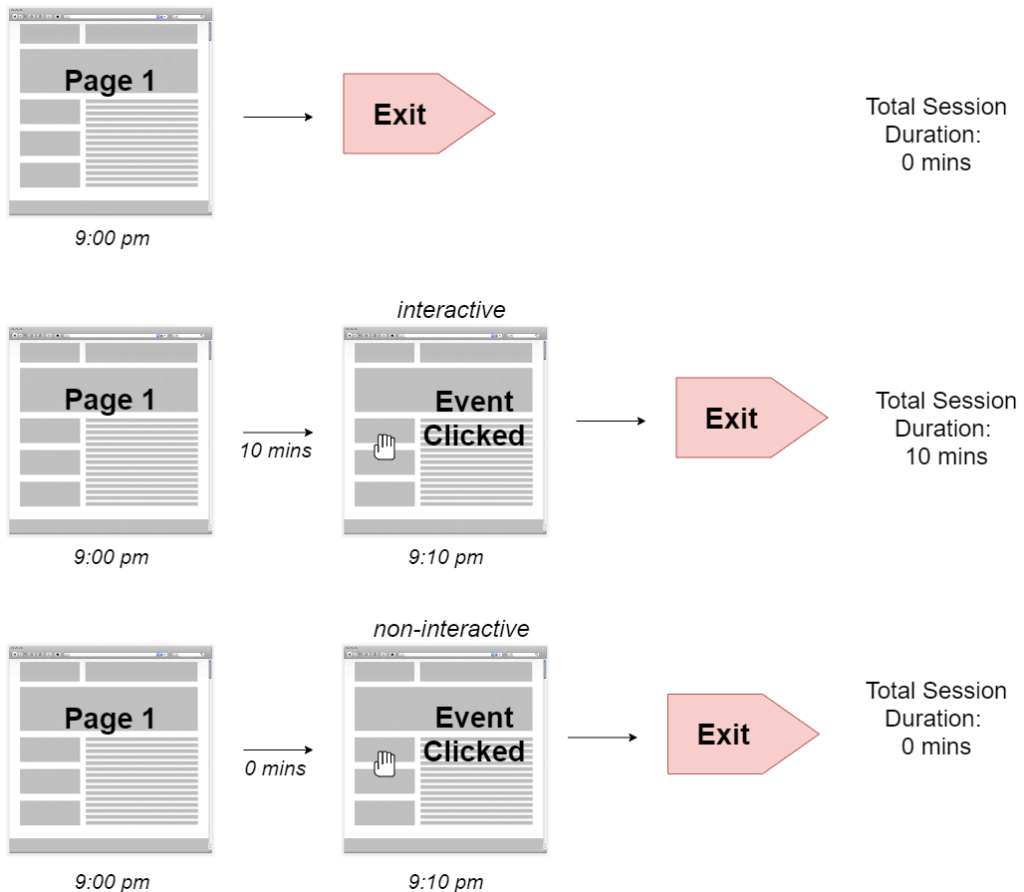
Interactive vs Non-Interactive Events: The Core Concept
At the heart of modern event tracking lies one of the most important and most misunderstood distinctions in digital analytics: Interactive events vs non-interactive events.
This distinction determines whether your analytics reflects true user intent or inflated engagement numbers. In 2026, when analytics powers AI systems, attribution models, and CRO decisions, getting this right is non-negotiable.
What Are Interactive Events?
Interactive events represent deliberate, user-initiated actions. They indicate that a user actively chose to engage, explore, or progress toward a goal.
In simple terms:
Interactive events answer the question: “Did the user intentionally do something?”
These events should contribute to engagement, conversion, and optimization metrics.
Common Examples of Interactive Events
-
Button clicks (e.g., “Sign Up”, “Buy Now”, “Request Demo”)
-
Form submissions and field interactions
-
Add-to-cart or remove-from-cart actions
-
Manual video play, pause, or seek actions
-
In-app gestures such as swipe, like, save, or share
-
Navigation to deeper content layers (accordion opens, tab switches)
-
Downloads initiated by the user
-
CTA interactions within emails or in-app messages
Each of these actions reflects intent, motivation, and decision-making the signals that matter most for analytics, CRO, and AI-driven optimization.
What Are Non-Interactive Events?
Non-interactive events capture passive, automatic, or system-triggered signals. These events occur without a conscious decision from the user and should not be treated as engagement by default.
In other words:
Non-interactive events answer: “What happened around the user?” not “What did the user choose to do?”
They provide valuable context but should not inflate engagement or conversion metrics.
Common Examples of Non-Interactive Events
-
Scroll depth tracking (25%, 50%, 75%, 100%)
-
Auto-play video impressions
-
Time-on-page thresholds
-
Element visibility or impression tracking
-
Viewability measurements for banners or modules
-
Automatic animation or carousel triggers
-
Lazy-loaded content impressions
These events are extremely useful for UX analysis, content performance, and behavior mapping, but they do not necessarily indicate intent.
Why the Interactive vs Non-Interactive Distinction Matters
Failing to distinguish between interactive and non-interactive events is one of the biggest reasons analytics data becomes misleading.
In 2026, this distinction impacts nearly every growth function.
1. Accurate Engagement Measurement
Interactive events should contribute to engagement metrics because they reflect active participation.
Non-interactive events, if misclassified, can:
-
Inflate engagement rates
-
Distort session quality signals
-
Mislead stakeholders about content performance
Clean classification ensures engagement means intent, not motion.
2. Reliable Conversion and Attribution Signals
Modern attribution models and AI-driven media buying depend on clean behavioral signals.
When passive events are incorrectly treated as engagement:
-
Upper-funnel channels appear stronger than they are
-
Conversion paths become noisy
-
Budget allocation decisions suffer
Proper event classification improves attribution accuracy and ROI optimization.
3. Better Conversion Rate Optimization (CRO Decisions)
CRO thrives on intent-based insights, not passive exposure.
Interactive events reveal:
-
Where users hesitate
-
Which CTAs motivate action
-
How users move through funnels
Non-interactive events support context, but optimization decisions should be driven primarily by what users choose to do.
4. AI-Ready Analytics and Automation
In 2026, analytics is no longer just for reporting — it fuels:
-
Predictive models
-
Smart bidding
-
Personalization engines
-
AI agents optimizing journeys in real time
These systems must distinguish between:
-
Actions that matter
-
Signals that merely occur
Clear separation between interactive and non-interactive events ensures AI systems learn from the right behaviors.
As privacy constraints increase and user journeys become more complex, intent signals are more valuable than ever.
Interactive events represent intent. Non-interactive events provide context.
How Event Tracking Works in GA4
Google Analytics 4 (GA4) introduced a fundamentally different way of thinking about analytics. Unlike Universal Analytics, where events were optional enhancements, GA4 is built entirely on an event-based data model.
Understanding how event tracking works in GA4 is critical if you want accurate engagement metrics, reliable attribution, and actionable CRO insights in 2026.
GA4’s Event-Centric Design Explained
.In GA4, everything is an event.
This includes:
- Page views
- Scrolls
- Clicks
- Video interactions
- Conversions
- Custom user actions
Each event can carry parameters that provide context, such as page location, button text, product ID, or funnel stage.
What This Means Practically
- Pageviews are no longer a separate hit type they are events
- Engagement is calculated based on event behavior, not just visits
- Poorly designed events directly impact engagement, attribution, and AI models
In short, event tracking is no longer a feature of GA4, it is GA4.
Engagement Rate vs Bounce Rate: A Critical Shift
One of the most misunderstood changes in GA4 is the replacement of bounce rate with engagement metrics.
How Universal Analytics Worked
In Universal Analytics:
- Bounce rate was defined as a session with only one interaction
- Events fired indiscriminately could artificially lower bounce rate
- Non-interactive flags were often misused or ignored
This resulted in misleading engagement metrics across many implementations.
How GA4 Measures Engagement
GA4 defines an engaged session if any one of the following conditions is met:
- Session lasts longer than 10 seconds
- A conversion event occurs
- Two or more events are triggered
Engagement rate is the inverse of bounce rate, but it is event-driven.
Why Event Design Matters More Than Ever
If non-interactive or passive events are misclassified as meaningful interactions:
- Sessions may appear engaged when users did nothing intentional
- Content performance becomes inflated
- CRO and UX decisions are distorted
This is why clear separation between interactive and non-interactive events is essential in GA4.
Interactive vs Non-Interactive Events in GA4: What Changed?
In Universal Analytics, analysts relied on a non-interaction flag to prevent certain events from affecting bounce rate.
GA4 removed this concept entirely.
Instead, GA4 uses:
- Session depth
- Event frequency
- Conversion signals
This makes intelligent event architecture more important than ever.
The 2026 Reality
- GA4 does not know intent by default
- It assumes events represent engagement unless designed otherwise
- Your implementation determines data quality — not the tool
Poorly structured events can:
- Inflate engagement metrics
- Confuse AI-driven insights
- Break attribution models
Well-structured interactive events:
- Improve engagement accuracy
- Strengthen conversion modeling
- Power smarter personalization and automation
Event Tracking in Google Tag Manager (GTM)
While GA4 is the analytics engine, Google Tag Manager (GTM) is the most scalable and future-proof way to implement event tracking.
In 2026, direct code-based tracking is fragile, slow, and difficult to govern. GTM provides a centralized, controlled layer between your website/app and analytics platforms.
Why Use GTM for Event Tracking?
GTM enables modern event tracking by offering:
- Independent tag management without constant developer involvement
- Centralized logic for analytics, ads, and experimentation tools
- Version control with rollback capabilities
- Faster experimentation and iteration
- Cleaner governance and documentation
For complex websites, apps, and e-commerce platforms, GTM is no longer optional; it is foundational.
Core GTM Components for Event Tracking
A strong event tracking setup in GTM relies on four key components working together.
Triggers
Triggers define when an event should fire.
Examples:
- Click triggers
- Form submission triggers
- Element visibility triggers
- Custom event triggers
Triggers should reflect intent, not just technical conditions.
Tags
Tags define what data is sent and where.
Most commonly:
- GA4 event tags
- Conversion tags
- Marketing platform events
Tags should send clean, structured event names and parameters.
Variables
Variables are reusable data points that provide context.
Examples:
- Click text
- Page URL
- Product ID
- Funnel stage
- User status
Variables ensure consistency and reduce duplication across tags.
DataLayer
The DataLayer is the most critical component for scalable event tracking.
It acts as a structured communication layer between:
- Website/app logic
- GTM
- Analytics and marketing tools
A well-implemented DataLayer:
- Makes tracking resilient to UI changes
- Improves data accuracy
- Enables cross-platform consistency
In 2026, DataLayer-driven tracking is the gold standard for enterprise-grade analytics.
Best Practices for Event Tracking in 2026
Modern event tracking is not about tracking everything, it’s about tracking the right things, the right way.
1. Focus on Intent, Not Motion
Track events that represent deliberate user actions, such as:
- CTA clicks
- Form submissions
- Product interactions
Treat passive signals like scroll depth or impressions as non-interactive contextual data.
Intent beats volume every time.
2. Use Structured and Predictable Naming Conventions
While GA4 no longer uses event_category, event_action, and event_label explicitly, structured naming is still essential.
Best practices include:
- Clear, human-readable event names
- Consistent parameter keys
- Alignment across GA4, GTM, ads, and CRM systems
This improves reporting clarity and AI interpretation.
3. Group Events by Funnel Stage
Map events to meaningful funnel stages, such as:
- Awareness
- Consideration
- Conversion
- Retention
This enables:
- Faster insight generation
- Cleaner dashboards
- Better CRO and lifecycle analysis
4. Validate Every Event Before Publishing
Never assume an event is working correctly.
Always validate using:
- GTM Preview and Debug Mode
- GA4 DebugView
- Browser-based debugging tools
Bad data is worse than no data because it leads to confident but wrong decisions.
5. Avoid Excessive or Noisy Events
More events do not mean better analytics.
Too many low-value events:
- Dilute insight
- Increase complexity
- Inflate processing and storage
- Confuse stakeholders
A focused event strategy always outperforms an exhaustive one.
Practical Event Tracking Examples (Across Business Models)
The difference between average analytics and decision-grade analytics lies in how events are classified and interpreted.
Below are real-world examples showing how interactive and non-interactive event tracking should be applied across different industries in 2026.
1. E-Commerce Event Tracking Examples
E-commerce platforms generate thousands of interactions daily. Without correct classification, engagement and conversion data quickly becomes misleading.
Interactive Events (Intent-Driven)
These events reflect clear purchase intent or funnel progression:
add_to_cart
Signals a deliberate step toward purchase.begin_checkout
Indicates strong buying intent and funnel movement.purchase
Final conversion event tied directly to revenue.apply_coupon
Shows price sensitivity and decision influence.
These events should always be treated as interactive, as they directly impact:
- Conversion rate optimization
- Attribution modeling
- Revenue forecasting
Non-Interactive Events (Contextual Signals)
These events provide behavioral context, not intent:
- Product impression
- Scroll depth percentage
- Auto-play video starts
They help answer questions like:
- Which products are seen but ignored?
- How far users explore before dropping off?
However, they must not inflate engagement metrics, or they will distort CRO insights.
2. SaaS & B2B Event Tracking Examples
SaaS and B2B journeys are longer, more research-driven, and multi-touch. Event tracking must reflect decision depth, not surface interaction.
Interactive Events
These actions show intent to evaluate or convert:
- Demo request click
- Pricing toggle interaction
- Feature trial signup
These events fuel:
- Lead quality scoring
- Funnel drop-off analysis
- Sales and marketing alignment
Non-Interactive Events
These signals help understand content consumption and persuasion, not engagement:
- Contextual scrolling
- Logo carousel exposure
- Time spent thresholds
They are valuable for:
- Content optimization
- Messaging clarity
- UX improvements
But they should remain non-interactive to preserve data integrity.
3. Content & Publisher Event Tracking Examples
For content-driven platforms, the challenge is separating reading behavior from conversion intent.
Interactive Events
These indicate active participation:
- Newsletter signup click
- Social share click
These events matter for:
- Audience growth
- Retention strategies
- Monetization analysis
Non-Interactive Events
These describe passive engagement patterns:
- Reading depth
- Ad impression viewability
- Section entry tracking
They help publishers understand:
- Content effectiveness
- Layout performance
- Scroll behavior patterns
But they should never be treated as engagement proxies.
Why These Examples Matter
Across industries, the principle remains consistent:
Intent creates value. Context creates understanding. Confusing the two creates bad decisions.
Thoughtful classification leads to:
- Reliable analytics
- Cleaner attribution
- Better optimization outcomes
Event Tracking and CRO (Conversion Rate Optimization)
Modern Conversion Rate Optimization services and agencies rely heavily on interactive events as their primary signals.
How CRO Teams Use Interactive Events
Interactive events power:
- A/B test success measurement
- Funnel leakage identification
- Micro-conversion analysis
- Personalization logic
- Experiment validation
Without clean interactive signals:
- Experiments fail silently
- False winners emerge
- Revenue impact is misjudged
The Role of Non-Interactive Events in CRO
Non-interactive events still play a crucial role by providing:
- Behavioral context
- Segmentation enrichment
- UX friction indicators
Together, interactive + non-interactive events form a complete optimization system explaining not just what converted, but why.
Event Tracking in a Privacy-First World
By 2026, analytics must operate under strict privacy and consent constraints.
Event tracking now needs to align with:
- Consent Mode v2
- First-party data strategies
- Modeled conversions
- Server-side tagging
A privacy-aware event framework ensures:
- Compliance with GDPR, CPRA, LGPD
- Resilient measurement despite cookie loss
- Long-term data reliability for AI and experimentation
This is why robust event design is no longer optional; it’s foundational.
AI and Event Tracking in 2026
AI-driven analytics, personalization, and media optimization depend entirely on event quality.
High-quality event tracking enables AI to:
- Predict conversions accurately
- Personalize content and offers
- Recommend UX improvements
- Automate bidding and budget allocation
Low-quality or misclassified events lead to:
- False predictions
- Ineffective personalization
- Poor automation outcomes
The rule remains simple: Garbage in equals garbage out.
Clean interactive signals create trustworthy AI insights.
How to Decide Whether an Event Is Interactive?
Use this simple decision framework before classifying any event:
- Was the action intentionally initiated by the user?
- Does it indicate progress toward a goal?
- Would counting it as engagement distort analysis?
- Is it aligned with business outcomes?
Decision Rule
- Yes to intent and progression → Interactive
- Contextual or automatic → Non-interactive
This discipline keeps analytics trustworthy and scalable.
Common Event Tracking Mistakes to Avoid
Even mature organizations struggle with these recurring issues.
1. Treating Passive Signals as Engagement
Scroll depth, impressions, and auto-events should never inflate engagement metrics.
2. Tracking Too Many Events
More data does not equal better insight. Noise slows decisions and confuses stakeholders.
3. Poor Naming Conventions
Inconsistent event names break reporting, dashboards, and AI interpretation.
4. Skipping Validation
Unvalidated events compromise:
- Attribution
- CRO
- Media optimization
- AI predictions
Bad data spreads faster than good insights.
Final Takeaway: Track What Truly Matters
Event tracking is no longer an analytics feature it is the behavioral intelligence system behind modern growth.
The distinction between interactive and non-interactive events is not technical trivia. It directly affects:
- Engagement accuracy
- Revenue attribution
- CRO outcomes
- AI reliability
- Long-term trust in analytics
In 2026, the brands that win are not those who track the most but those who track with intent, clarity, and discipline.