In our previous blog on 5 UX trends, we covered topics like: What is personalization
- What is personalization
- How it works wonders for your user engagement
- What benefits you reap by implementing personalization on your website and mobile site
Engaging prospects to convert and gaining frequent visitors to create a loyal customer base is a dream come true for every business. But, these trends are not as easy to implement on your website. It requires a right set of skills and an extremely powerful tool like Google Optimize 360 to create, test and adapt what you strategize.
In this blog, we will go through implementation a few of the UX trends mentioned in the earlier blog, using this tool. To know more about Google Optimize 360 features, please refer to this blog that I had written earlier.
1. Location-based Personalization - Geo Targeting with Google Optimize
Location based personalization can enrich the user experience. It is with great excitement that I am taking up this feature first. You can achieve location-based personalization using the geo-targeting feature of Google Optimize 360. India is a land of festivals. Let’s understand how location-based personalization will work in real-time for this scenario. Say in Gujarat and the festival of Navaratri - the world’s longest dance festival - is going on. During the same time in Bengal, the nine-day long Durga Pooja is on. Being an eCommerce store owner selling ethnic-wear, you want to roll out offers to both these sets of customers. With Google Optimize 360, you can customise your homepage slider or banner section to target these sets of users based on their geographical location.
 Image 1: Geo-targeting with Google Optimize 360
2. Time-based Personalization - Javascript Variable or custom Javascript
What does the trick is, to implement a javascript variable with the “local day part” value. This gets updated based on the current time of the day. Use this variable to create time-based personalization. Let’s take one real-life scenario. Your e-commerce store experiences heavy traffic between 11 AM to 1 PM but the conversions are very low. To improve conversion rate, you can show banner or a countdown to sale timer with specific offers for this time period. Vice versa, let’s say in another time slot, traffic is lower and you want to increase that with user engagement. This is where you can put to use this time based personalised method in Google Optimize.

Image 2: Javascript Variable with Google Optimize 360
3. Cross-Selling
For running this personalization, you shall require an advanced implementation that enables you to identify user’s spending capacity. Using this information, you can create a “high intent users” segment in Google Analytics. Based on this segment, you can create an audience and use it as your target for cross-selling through Google Optimize 360.
Let’s take one example. You can create a segment of users who are brand conscious and then cross-sell products of similar brand using Optimize 360 audience targeting.
- You can change sequence of brand filter or you can highlight same in filter section
- You can also show products of similar brands using advanced implementation
You can also create an experiment which shows above combination in a test using Multivariate test feature of Google Optimize.

Image 3: Audience Targeting with Google Optimize 360
4. Enhanced Shopping Experience
You can create a segment of users who dropped from, let’s say, for example, the checkout page after adding a product. Now, use this segment as audience targeting in Optimize 360. You now have wide options of getting back to them. Show popups with some offers or deliver product information when that user revisits your site and persuade them to complete their order.
Audience Targeting
Basically, marketers use audiences for remarketing and retargeting. The exciting part of Optimize 360 is to allow you to target your specific audience for your experiments. Using Google analytics segmentation feature, you can able to create audiences and use it in experiment targeting. This will help you to focus on your specific group of users who have some specific behaviour on your website. If you have Google Analytics 360 account, you should try out Optimize 360 to implement experiments and personalised experience by setting up targeting rule for your audiences.
-
High-Value Customer: A Usage of Audience Targeting
In simple terms, high-value customer is your returning customer who contributes to your revenue growth over and over through repeat businesses or referrals. Personalising their experiences may lead to high conversions and also improve user engagement. You can slice and dice your data to separate your customers based on their actions, demographics and interests. You can the use it as audience targeting and measure the performance of your personalization campaign with Google Optimize 360. Similarly, you can create audiences like “Drop off at Checkout page/cart page”, “Added To Wishlist” and use it to enhance your user’s personalization experience.
What’s Next from Google: Adwords Integration with Google Optimize Account
There is an exciting update from Google regarding the upcoming integration between Google Optimize and Adwords. This will help digital marketers and testing teams to test their customized landing pages based on keywords, ad group or campaigns that are associated with ads.
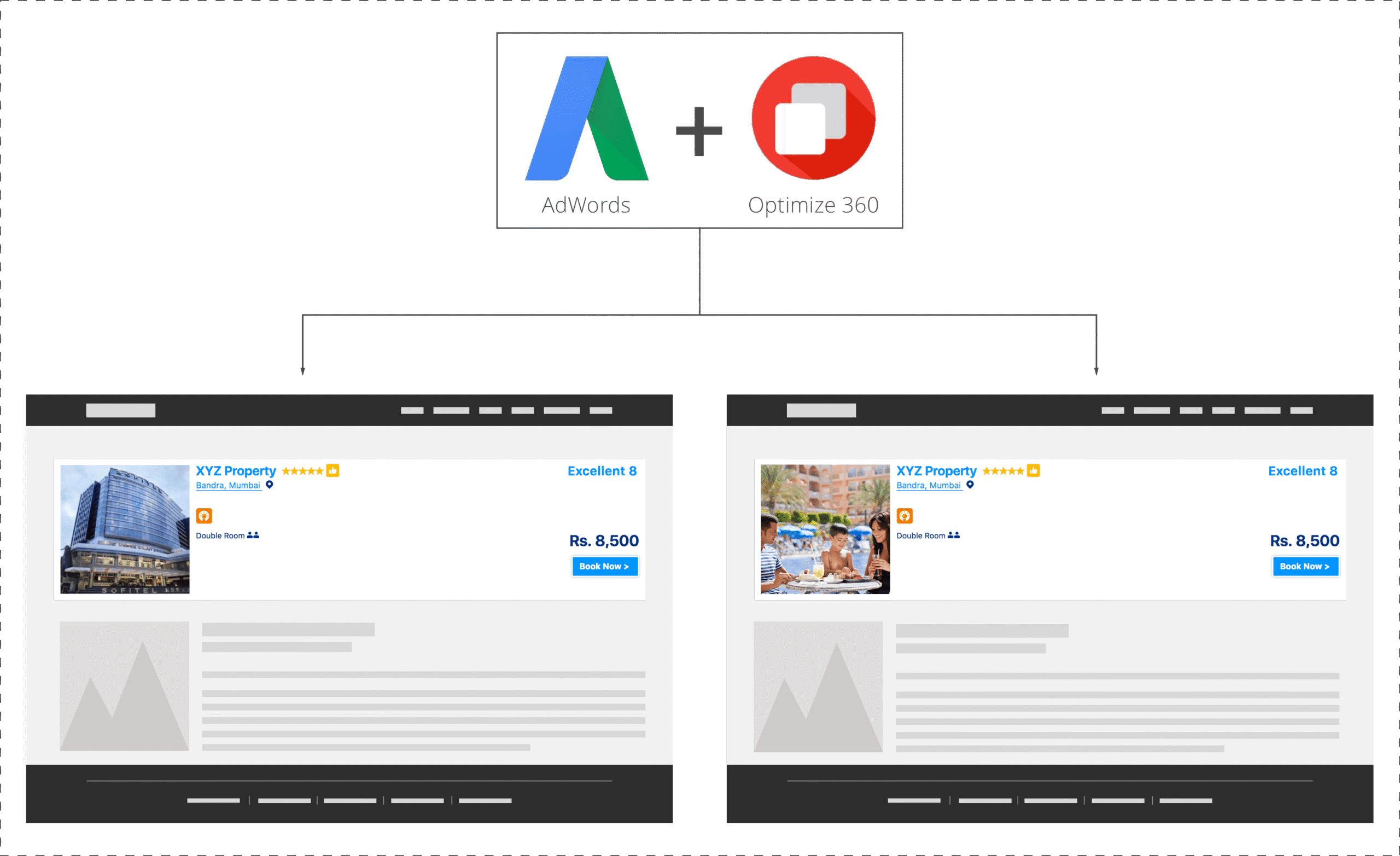
In marketing next 2017 event, Google gives an example that how it will be beneficial to business that running campaign:
“Suppose a hotel wants to improve its landing page for the keyword family friendly hotels. Using Optimize, the hotel can create and test a new variation of the landing page, one that features an image of a family enjoying themselves at the hotel pool, instead of a generic image of the hotel exterior. If the new page leads to more reservations, they’ve got a win.“
This integration will be available for Optimize and Optimize 360 and will be launched in a few weeks.
Explore interesting personalization use cases across different domains with our upcoming webinar. Grab the chance of interacting with subject matter experts and get real life insights on implementing website personalization.