Hello There!

Lorem ipsum dolor sit amet, consectetur adipiscing elit,

Analytics Alerting System: Why Alerts Fail and How to Fix It

An Alert Without a Playbook Is Just Noise: Building an Analytics Alerting System That Works

In this Proactive Analytics series, we have covered the foundation (Proactive Analytics), the detection layer (Anomaly Detection in GA4), and a high-stakes use case. All three end at the same place. Something is detected. An alert fires. And then what?

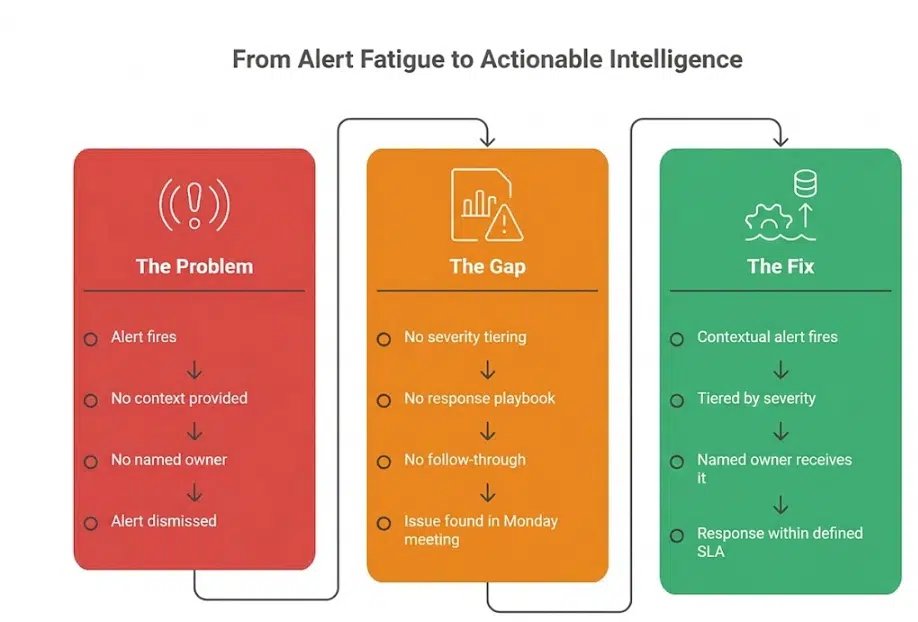
For most analytics teams, the honest answer is: not much. The alert lands in an inbox. Someone glances at it. It gets marked as read without action. Or it does not get read at all.

This is not a technology problem. It is a design problem. And it is the most common reason proactive analytics setups fail to deliver their full value.

The Alert Fatigue Problem Is Real, and It Is Not Limited to IT

Alert fatigue is widely documented across operations teams. Splunk’s State of Observability 2025 report, surveying 1,855 ITOps and engineering professionals, found that 73% of organizations experienced outages directly linked to ignored or suppressed alerts. The same research found that 59% say they have too many alerts, and 55% deal with too many false positives. The AI SOC Market Landscape 2025 report by SACR found that 40% of alerts are never investigated, and 61% of teams admitted to ignoring alerts that later proved critical.

These figures come from security and operations contexts. But the dynamic is identical in analytics:

  • A GA4 custom insight fires daily because the threshold is set too low
  • An anomaly alert triggers during a known promotional period because baselines have not been calibrated
  • A data quality alert lands in a shared inbox with no named owner and no expected action
  • A team that has been burned by false positives stops treating alerts as actionable signals

The result is an analytics alerting system that runs in the background, generates notifications, and influences nothing. The monitoring is in place. The detection is working. The value is lost at the last step.

Why Analytics Alerts Get Ignored

Understanding why alerts fail is the first step toward designing a system that works. The reasons are consistent across analytics teams:

No Context in the Alert Itself

An alert that says “sessions dropped by 23%” gives you a number. It does not tell you which pages, which segments, which device types, which time period, or what the likely cause is. Without context, the recipient cannot assess severity or take action without conducting their own investigation first. Most do not. They dismiss the alert and move on.

No Severity Tiering

When every alert looks the same, a revenue-impacting conversion failure competes for attention with a minor informational fluctuation. Teams learn quickly that most alerts are low severity. They apply that assumption to all of them. The critical ones get caught in the same net as the noise.

No Named Owner

An alert sent to a team, a shared inbox, or a distribution list has no clear owner. Everyone assumes someone else will handle it. This is not a behavioural failure; it is a structural one. Alerts without owners get resolved at the speed of the slowest person who reads them, which is usually never.

No Defined Response Expectation

Even when an alert reaches the right person, if there is no defined response protocol, the recipient has to decide in the moment what to do, when to do it, and who to involve. That decision overhead is often enough to push the response to “later,” which becomes never.

Static Thresholds Generating Predictable Noise

As covered in the Anomaly Detection in GA4 blog, static sensitivity settings produce alerts during expected peaks, known seasonal patterns, and normal day-of-week variation. When a team receives enough of these, they stop trusting the system. A well-calibrated analytics alerting system is the foundation of alert trust. Without trust, the system is decorative.

Already experiencing alert fatigue in your analytics setup? Tatvic’s team can help you audit your current alerts and identify what to keep, recalibrate, and remove. Get in touch.

What a Working Analytics Alerting System Actually Looks Like

An effective analytics alerting system is not defined by how many alerts it generates. It is defined by how many alerts drive action. The design principles that separate the two are straightforward.

Alerts Carry Context, Not Just Numbers

Every alert in a working analytics alerting system answers four questions immediately:

  • What changed: the specific metric, event, or parameter affected
  • By how much: the magnitude of the deviation and the expected range
  • Since when: the precise time the anomaly began
  • Which segment: the dimension combination where the deviation is isolated (browser, region, device, channel)

This context is what turns a notification into a brief. The recipient knows what they are looking at before they open the dashboard. Response time drops significantly when the investigation has already been done by the system.

Severity Is Tiered by Business Impact, Not Metric Size

A working analytics alerting system does not treat all anomalies equally. It routes alerts based on their proximity to revenue and decision-making:

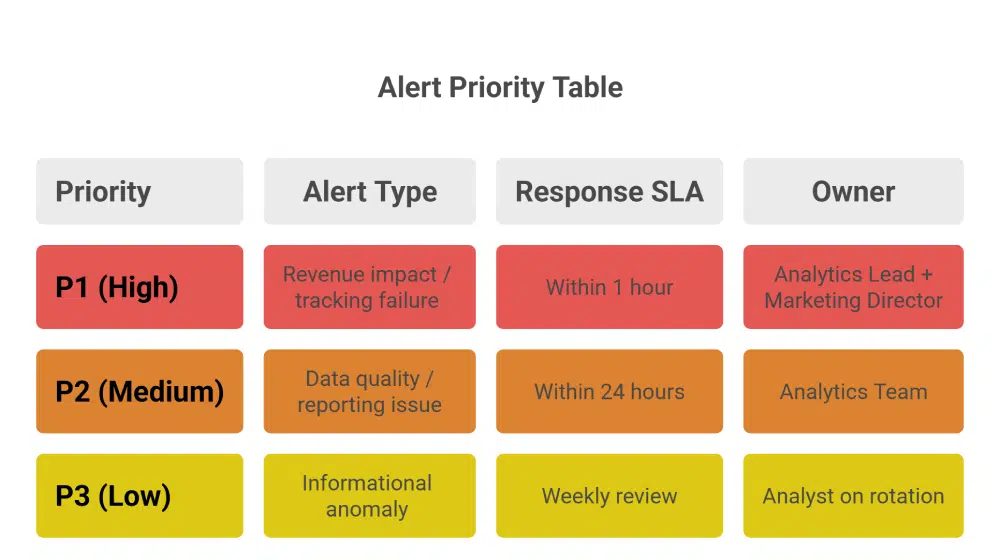
  • A conversion tracking failure is a P1. It affects the accuracy of every marketing decision made from that point forward.
  • A parameter-level data quality issue is a P2. It affects reporting accuracy but not necessarily in real time.
  • An informational anomaly with no immediate business impact is a P3. It is worth knowing about, but it does not need to interrupt anyone’s day.

Tiering prevents the critical from being buried by the routine. It also gives recipients a rational basis for prioritisation rather than asking them to judge severity from a raw notification.

Every Alert Has a Named Owner and a Defined SLA

High-performing analytics alerting systems remove ambiguity before alerts even fire. Teams define ownership in advance, mapping every alert type to a named role or individual with a clear response time expectation.

  • P1 alerts: analytics lead responds within one hour, marketing director informed within two
  • P2 alerts: analytics team responds within 24 hours
  • P3 alerts: reviewed in the next weekly analytics meeting

This structure removes decision overhead from the recipient. They know what they are expected to do and by when.

How to Build an Analytics Alerting System That Drives Action

Building an analytics alerting system that works is a four-step process. Each step addresses one of the failure points described above.

Step 1: Audit your existing alerts and remove the noise.

Start by listing every alert currently active in your GA4 setup, your anomaly detection configuration, and any third-party monitoring you have in place. For each one, ask: has this alert driven a response in the last 60 days? If not, it is noise. Disable it or recalibrate it before adding anything new. A smaller set of high-trust alerts is more valuable than a comprehensive set of ignored ones.

Step 2: Build a tiered alert hierarchy.

Map your alerts to three priority levels based on business impact:

  • P1: Revenue impact, conversion tracking failure, data collection break
  • P2: Data quality issue affecting reporting accuracy, parameter-level anomaly, attribution signal change
  • P3: Informational anomaly, dimension-level shift, informational trend change

Assign each tier a response SLA and a named owner. The tier system only works if the definitions are agreed upon by the team before an alert fires, not negotiated in the moment.


Step 3: Add context to every alert.

Work with your anomaly detection and monitoring setup to ensure every alert includes: what changed, by how much, since when, and in which segment. This may require configuring alert templates in your monitoring solution or using Tatvic’s anomaly detection solution, which surfaces this context automatically. Without it, your alerts will generate activity but not resolution.

Step 4: Build and distribute a response playbook.

For each alert type, document:

  • The first action the owner is expected to take
  • The diagnostic questions to answer within the first 30 minutes
  • The escalation path if the issue cannot be resolved at the owner level
  • The communication template for notifying stakeholders when a P1 is active

This playbook does not need to be long. A single page per alert tier is sufficient. The system removes the decision overhead that pushes teams to deprioritize alerts. When the next step is obvious, the response happens. You can read more about how Tatvic’s anomaly detection solution surfaces contextual intelligence that feeds directly into this kind of response workflow.

The Alert Playbook in Practice: What Good Looks Like

Here is what a P1 response looks like in a team that has built this system:

6:45am: Anomaly detection flags a 67% drop in mobile purchase events, isolated to iOS users, beginning at 6:10am

Alert routes to analytics lead with context: affected segment, magnitude, start time, and a link to the relevant GA4 exploration

Analytics lead opens the alert, has enough context to begin investigation immediately

By 7:15am: GTM configuration issue identified on an iOS-specific tag after a previous night’s deployment

By 8:00am: Fix deployed, tracking restored, stakeholders notified via a pre-written P1 communication template

Total time from anomaly onset to resolution: under two hours

Without a working analytics alerting system, the same issue surfaces in a Monday morning meeting. The team spends the first hour of the week diagnosing a problem that started the previous Friday. Three days of corrupted mobile conversion data have already fed into weekend campaign optimisation.

The difference is not the detection. As covered across the previous blogs in this series, the detection capability is available. The difference is what happens the moment the alert fires.

The Takeaway: Detection Is Only Half the System

This series started with a simple observation: reactive analytics finds problems after they have already done their damage. The blogs that followed showed what proactive monitoring looks like across anomaly detection, attribution, and data collection.

But proactive analytics is only complete when the detection layer connects to an action layer. An analytics alerting system that detects everything and acts on nothing is a more sophisticated version of the same reactive problem.

The full picture looks like this:

  • Detect: Anomaly detection across metrics, parameters, dimensions, and attribution patterns
  • Validate: Data sanity checks that confirm the signal is real before the alert reaches a human
  • Alert: Contextual, tiered notifications routed to named owners with defined response expectations
  • Act: A playbook that tells the recipient exactly what to do and by when

When teams connect all four layers: Detect, Validate, Alert, and Act - proactive analytics begins to deliver its full value: faster problem resolution, decisions backed by trusted data, and teams that act on alerts because the system has earned their confidence.

That is what a complete analytics alerting system looks like. And that is the standard worth building toward.

Ready to turn your analytics monitoring into a system that actually drives action? Tatvic’s team can audit your current alerting setup, identify the noise, and help you build a response playbook tailored to your business. Schedule a call with Tatvic’s experts today.

Anomaly Detection in GA4: How to Get More Out of It

This is the third blog in Tatvic’s Proactive Analytics series. In the first blog , we established why reactive analytics is costing businesses more than they realise. In second blog, we applied that thinking to marketing attribution. This blog focuses on the capability that sits at the heart of proactive analytics: anomaly detection in GA4.

We have written about anomaly detection before from a technical standpoint. This blog takes a different angle: what GA4’s built-in anomaly detection already does well, and how extending it across additional monitoring layers makes your entire analytics setup significantly more powerful.

GA4’s anomaly detection is a strong starting point. The question worth asking is: how much further can you take it?

What GA4 Built-in Anomaly Detection Already Does Well

GA4’s approach to anomaly detection in GA4 is genuinely sophisticated. It uses a Bayesian statistical model that learns from your historical data to establish expected ranges for your metrics:

  • Hourly anomalies: Based on 2 weeks of historical data
  • Daily anomalies: Based on 90 days of historical data
  • Weekly anomalies: Based on 32 weeks of historical data

The September 2024 GA4 update added anomaly detection directly into detail reports, surfacing unexpected spikes or dips as visual indicators on your charts without any manual setup. Custom insights extend this further, allowing you to define specific conditions that trigger alerts for the metrics that matter most to your business.

This is a meaningful capability. It surfaces significant metric-level shifts automatically, reduces the manual monitoring burden, and gives analysts a starting point for investigation when something in your data changes. For teams that have not yet enabled GA4’s built-in anomaly detection, doing so is the right first step.

The opportunity is in what comes next.

Taking Anomaly Detection in GA4 Further

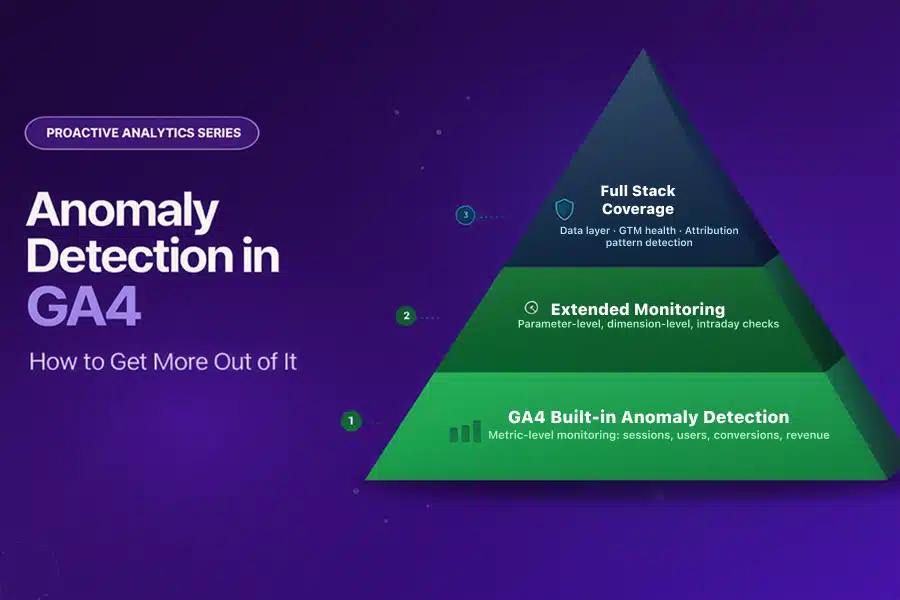
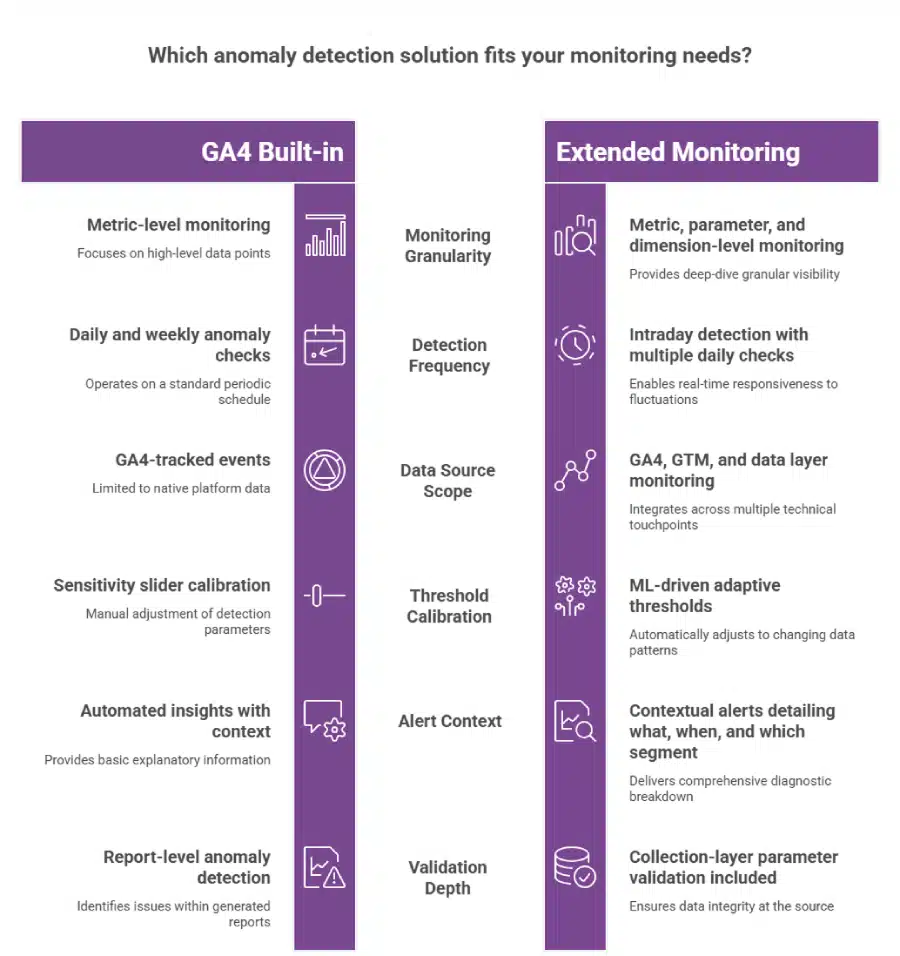
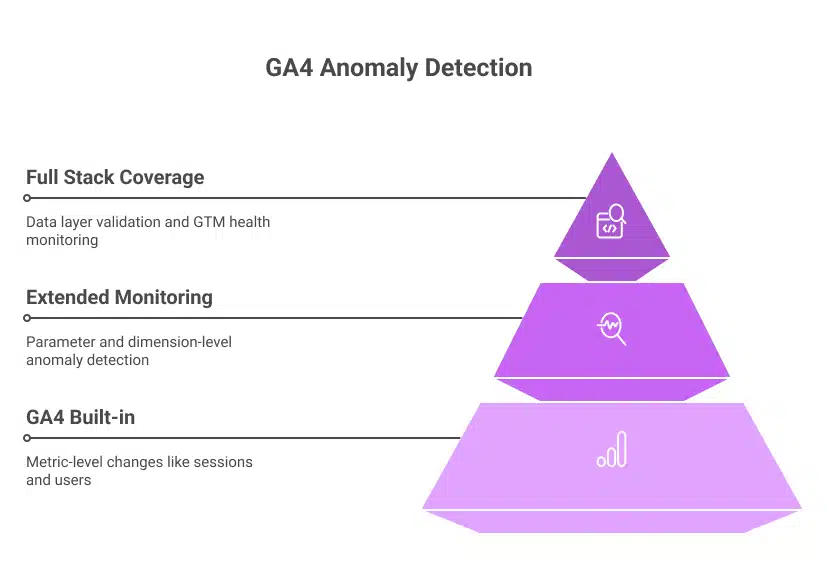
GA4’s built-in monitoring operates at the metric level: sessions, users, conversions, revenue. This is the right layer to start with. But business anomalies rarely live only at the metric level.

They live in the data underneath the metrics:

  • A conversion event firing correctly but passing the wrong parameter value
  • A revenue drop isolated to one browser version while all others remain stable
  • A checkout parameter schema mismatch introduced by a developer change that does not affect the headline conversion count

At the metric level, these look normal. At the parameter, dimension, and data collection layer, they are anomalies with real business consequences.

Extending anomaly detection in GA4 across these deeper layers is what separates a monitoring setup that catches the obvious from one that catches the costly.

Three Layers That Make GA4 Anomaly Detection More Powerful

Layer 1: Parameter-Level Monitoring

GA4’s built-in anomaly detection watches whether a metric has moved. Parameter-level monitoring watches whether the data feeding that metric is accurate.

In practice, this means:

  • Validating event parameters against expected schemas on a continuous basis
  • Flagging null values, type mismatches, or unexpected value ranges at the point of collection
  • Detecting when an event fires more or fewer times than expected within a session
  • Catching currency code mismatches, null transaction IDs, or malformed product arrays before they populate your reports

This is where Tatvic’s GTM health monitoring operates: at the collection layer, validating data before it reaches the metric level where GA4’s anomaly detection watches. Together, they create a complete monitoring chain from data entry to report.

Layer 2: Dimension-Level Anomaly Detection

Business anomalies are rarely uniform. A revenue drop might be specific to:

  • Users on a particular browser version after a site deployment
  • Users in a specific geographic region after a payment provider outage
  • Users on a particular device type after a mobile UX change

When this happens, the aggregate revenue metric may remain within its expected range while the dimension-level collapse goes undetected. Dimension-level anomaly detection monitors specific combinations of metrics and dimensions simultaneously, surfacing the signal that the aggregate hides.

Tatvic’s in-house anomaly detection solution allows monitoring across dimension combinations such as revenue by browser and region simultaneously, flagging the isolated drop before it is absorbed by a healthy aggregate. You can see how this works across real client scenarios in the anomaly detection safeguards business performance blog.

Layer 3: Intraday Monitoring on High-Value Events

GA4’s daily anomaly model is well-suited to identifying overnight or multi-day shifts in your data. For time-sensitive business events, intraday monitoring adds an additional layer of speed.

Consider the scenarios where timing matters most:

  • A new campaign launches with a tracking misconfiguration at 9 am. Intraday monitoring catches it within hours.
  • A payment flow breaks during peak trading. Conversion data drops. An intraday alert fires the same morning.
  • A flash sale drives traffic that exceeds infrastructure capacity. Bounce rates spike sharply. The alert arrives before the sale ends, not after.

Tatvic’s anomaly detection runs checks multiple times per day, giving teams hours rather than a full day to respond to time-sensitive issues. The faster the detection, the smaller the window during which bad data influences decisions.

Adaptive Baselines: Making GA4 Anomaly Detection Smarter Over Time

GA4’s custom insights include a sensitivity slider that lets you calibrate how easily anomalies are flagged. This gives you control, and it also creates an ongoing calibration responsibility:

  • Promotional periods that double your typical traffic can trigger alerts for spikes that are entirely expected
  • Seasonal patterns require manual threshold adjustment before each peak period
  • Day-of-week variation can produce false alerts on naturally slower traffic days

ML-driven adaptive baselines solve this automatically. Rather than a fixed sensitivity setting, adaptive models continuously learn your business patterns, including seasonality, campaign cycles, and day-of-week variation, and adjust expected ranges accordingly.

The result: anomaly detection in GA4 that produces actionable alerts during campaigns, not noise. Expected peaks are recognised as expected. Genuine deviations stand out clearly because the baseline already accounts for normal variability.

Extending Anomaly Detection to Attribution Patterns

One of the most valuable extensions of anomaly detection in GA4 is applying it to attribution data rather than just traffic and conversion volume.

When paid social’s share of conversion credit drops by 30% over 48 hours without a corresponding change in spend, that is an anomaly in your attribution chain, not your traffic volume. GA4’s built-in monitoring watches metric totals. Attribution pattern monitoring watches how credit is distributed across channels over time.

As explored in the proactive attribution blog, this layer of anomaly detection catches UTM failures, cross-domain tracking breaks, and channel misattribution while there is still time to act, before budget decisions are made on a distorted performance picture.

The Market Signal: Why Businesses Are Extending Beyond Built-in Tools

The investment trend in anomaly detection reflects how seriously businesses are treating this. The global data anomaly detection market is expected to reach $33.32 billion by 2035, growing from $5.61 billion in 2025 at a CAGR of 19.5%, according to Market.us research. The ML and AI segment is growing fastest, at 18.7% CAGR.

This growth is driven by one consistent business insight: native platform monitoring, while valuable, is the starting layer. The organisations investing in extended anomaly detection are the ones treating data reliability as a business priority, not just an analytics function.

How to Extend Your GA4 Anomaly Detection Setup

Building on GA4’s strong foundation is a layered process. Start with what is already available and add depth systematically.

Step 1: Enable and configure GA4’s built-in anomaly detection fully.

  • Activate custom insights for your highest-value metrics: revenue, purchase events, lead form completions
  • Set evaluation frequency to daily for core KPIs
  • Review and act on automated insights weekly as a starting discipline

Step 2: Add intraday monitoring on your most time-sensitive events.

  • Identify the three to five events where a same-day detection matters most
  • Configure intraday anomaly checks on purchase events, payment initiations, and primary conversion actions
  • Set contextual alerts that include what changed, by how much, and which segments are affected

Step 3: Layer in dimension-level monitoring on your top segments.

  • Map your three to four highest-value dimension combinations: top browsers, key markets, primary device types
  • Set anomaly detection specifically on these combinations
  • Use these alerts as the early warning system for localised failures that aggregate metrics conceal

Step 4: Validate your data collection layer continuously.

  • Anomaly detection in GA4 at the report level depends on accurate data collection
  • Pair your monitoring setup with continuous GTM health checks and parameter-level validation
  • This ensures the data GA4 watches is reliable before anomaly detection begins

Step 5: Extend anomaly detection to your attribution patterns.

  • Monitor direct traffic share and channel attribution distribution alongside volume metrics
  • Set alerts for shifts in attribution credit that do not correspond to spend changes
  • This closes the loop between proactive analytics and proactive attribution monitoring

The Takeaway

GA4’s built-in anomaly detection is a genuine asset. It gives analytics teams automated, ML-powered monitoring without additional tooling, and it has improved significantly with each GA4 update.

Extending it adds three meaningful capabilities:

  • Parameter and data layer monitoring that validates what GA4 watches before it is watched
  • Dimension-level detection that surfaces localised anomalies that aggregate conceal
  • Intraday intelligence that reduces detection time from days to hours on your most critical events

The goal is not to replace what GA4 provides. It is to build a monitoring setup that is as complete as the business decisions that depend on it.

Every analytics setup benefits from anomaly detection. The deeper the monitoring goes, the more reliable the data it protects.

Want to understand how your current GA4 anomaly detection setup can be extended? Tatvic’s team can map your monitoring coverage across metric, parameter, dimension, and collection layers in a structured review. Schedule a call with Tatvic’s experts today.

How Anomaly Detection Safeguards Business Performance

How Anomaly Detection Safeguards Business Performance -Tatvic

Anomaly Detection is the silent guardian of your data, constantly at work behind the scenes.

Are hidden issues silently draining your business’s revenue, jeopardizing your security, or skewing your crucial data insights?

In today’s hyper-connected, data-rich world, unexpected deviations can appear anywhere from a sudden dip in website conversions to a subtle, yet dangerous, shift in network traffic.

These “anomalies,” often invisible to the naked eye, hold the key to uncovering both significant threats and untapped opportunities.

It’s a powerful discipline at the intersection of data science, AI, and machine learning, focused on identifying those rare events, observations, or data points that diverge significantly from the expected pattern.

More than just a buzzword, anomaly detection is becoming an indispensable tool for businesses aiming to stay competitive, secure, and data-driven.

In this comprehensive guide, we’ll peel back the layers of anomaly detection.

You’ll learn exactly what it is, why it’s not just a technicality but a strategic imperative for your business, its various types, how it works, and its impactful real-world applications.

We’ll also address common challenges and best practices for implementation, ultimately showing you how Tatvic empowers businesses like yours to harness this technology for smarter, safer operations.

What is Anomaly ?

An anomaly is any data point, event, or observation that significantly deviates from the normal or expected pattern within a dataset.

It’s an outlier or an irregularity that doesn’t conform to the typical behavior or trend.

These unusual occurrences can signal anything from a data error to a critical system issue, a fraudulent activity, or an unexpected but important business trend.

What Exactly is Anomaly Detection?

At its core, Anomaly Detection (also known as Outlier Detection) is the process of identifying data points or patterns that do not conform to an expected behavior.

Think of it as finding the “needle in the haystack” that one data point, or a sequence of points, that is significantly different from the vast majority of other data points.

While “normal” data often follows predictable trends and distributions, anomalies stick out because they violate these norms.

These deviations can be caused by various factors, including:

  • Errors: Data entry mistakes, sensor malfunctions.
  • Rare Events: A sudden, legitimate spike in sales due to a viral campaign.
  • Malicious Activity: Fraudulent transactions, cyber-attacks.
  • System Failures: Server crashes, network outages.

Unlike simple thresholding, which flags values above or below a fixed limit, anomaly detection often involves sophisticated algorithms that learn the “normal” baseline behavior from historical data.

This allows it to identify subtle, complex, or evolving abnormalities that a static rule might miss. It’s about understanding the context and the relationships within the data, rather than just isolated values.

What is Anomaly Detection - Tatvic

The ‘Why’: Why Anomaly Detection is Critical for Modern Businesses

In an era where data is king, overlooking anomalies is akin to leaving money on the table or an open door for threats.

Anomaly detection is not just a ‘nice-to-have’ technical capability; it’s a strategic ‘must-have’ that delivers tangible business benefits across various functions.

Importance Of Anomaly Detection In Various Business Functions:

1. Safeguarding Revenue & Preventing Fraud

Fraudulent activities, whether in financial transactions, advertising clicks, or e-commerce purchases, can lead to substantial revenue loss. Anomaly detection systems continuously monitor patterns, flagging suspicious transactions, unusual login attempts, or abnormal clickstream data that deviate from typical user behavior, allowing for rapid intervention and prevention.

2. Enhancing Operational Efficiency & Predictive Maintenance

For businesses with physical assets or complex IT infrastructures, anomalies can signal impending equipment failure or operational bottlenecks. By detecting unusual sensor readings (e.g., temperature spikes, abnormal vibrations) or unexpected latency in IT systems, companies can perform predictive maintenance, minimize downtime, and optimize operational costs, moving from reactive fixes to proactive solutions.

3. Optimizing Digital Marketing & User Experience

For Tatvic’s core audience, this is paramount.

Anomaly detection can transform digital marketing efforts:

  • Website Traffic: Identify sudden, inexplicable drops or spikes in traffic that could indicate bot activity, tracking errors, or a trending issue.
  • Conversion Rates: Pinpoint abnormal shifts in conversion rates for specific campaigns, channels, or user segments, allowing for quick A/B test adjustments or problem resolution.
  • Ad Spend & Performance: Flag unusual ad spend patterns, click fraud, or campaigns underperforming unexpectedly, ensuring budget efficiency.
  • Customer Journey: Spot deviations in user behavior sequences that might indicate frustration, confusion, or a new successful path.

4. Improving Data Quality & Accuracy

Garbage in, garbage out. Anomalies within your datasets can skew analysis, leading to incorrect conclusions and flawed strategies. Anomaly detection helps cleanse data by identifying erroneous entries, sensor glitches, or data collection issues, ensuring that your analytics and machine learning models are built on a solid foundation of reliable data.

5. Strengthening Cybersecurity & IT Operations

In the face of ever-evolving cyber threats, anomaly detection is a first line of defense. It helps identify:

  • Unusual Network Activity: Malicious intrusions, data exfiltration, or unauthorized access attempts.
  • System Performance Degradation: Subtle shifts indicating a server overload or an application issue before it escalates.
  • Insider Threats: Employee behaviors that deviate from their normal work patterns.

6. Gaining Competitive Advantage

By proactively identifying and addressing issues, optimizing performance, and preventing losses, businesses leveraging anomaly detection gain a significant edge. They can react faster to market changes, maintain higher levels of service quality, and make data-driven decisions with greater confidence.

What Are The Types of Anomalies? Understanding the Deviations

Not all anomalies are created equal.

Understanding the different types helps in selecting the most appropriate detection methods and interpreting their significance.

Let’s Explore Different Types Of Anomalies:

1. Point Anomalies (Outliers)

These are single data instances that deviate significantly from the rest of the dataset.

  • Example: A credit card transaction of $10,000 in an account where the average transaction is $50.
  • Example in Marketing: A single blog post suddenly receiving 10x its usual traffic for no apparent reason, or a single day with 0 conversions on an otherwise active e-commerce site.

2. Contextual Anomalies

A data instance is anomalous only in a specific context. It might be normal in a different context.

  • Example: A temperature of 30°C in a server room is normal during summer but highly anomalous in winter.
  • Example in Marketing: A spike in website traffic at 2 AM is normal for a global product launch, but anomalous for a local business on a typical weekday.

3. Collective Anomalies

A collection of related data instances that collectively behave anomalously, even if individual data points within the collection are not anomalous.

  • Example: A gradual, sustained decrease in network bandwidth over several hours, which individually might seem small, but collectively indicates a problem.
  • Example in Marketing: A consistent, but slight, drop in session duration across multiple pages over a week, signaling potential user frustration that isn’t evident from individual page metrics.

How Anomaly Detection Works: Methods & Techniques

The core idea behind anomaly detection is to build a model of “normal” behavior and then identify instances that deviate significantly from this model.

The methodologies employed can range from simple statistical rules to complex machine learning algorithms.

1. Overview of the Process:

  1. Data Collection: Gathering relevant data streams (e.g., logs, sensor data, transaction records, website analytics).
  2. Data Preprocessing: Cleaning, normalizing, and transforming data to suit the chosen method.
  3. Model Training: Teaching the algorithm what “normal” looks like based on historical data.
  4. Anomaly Scoring/Classification: Assigning an anomaly score to new data points or classifying them as normal/anomalous.
  5. Alerting & Action: Notifying relevant personnel or triggering automated responses when anomalies are detected.

2. Statistical Methods

These are often the simplest forms, suitable for data with clear statistical properties.

  • Z-score/Standard Deviation: Identifies data points that are a certain number of standard deviations away from the mean.
  • Interquartile Range (IQR): Flags values outside a certain range based on quartiles, robust to outliers.
  • Gaussian Models: Assumes data follows a normal distribution and flags points with low probability under this distribution.

3. Machine Learning Approaches

These are more sophisticated and can learn complex, non-linear relationships, making them suitable for high-dimensional or complex data.

  • Clustering-based: Algorithms like K-means or DBSCAN group similar data points together. Anomalies are data points that fall outside these clusters or form very small, isolated clusters.
  • Classification-based: Training a classifier (e.g., One-Class SVM) on “normal” data. Any new data point not classified as normal is an anomaly.
  • Proximity-based: Methods like Isolation Forest or Local Outlier Factor (LOF) identify anomalies by how “isolated” or how different they are from their neighbors.
  • Deep Learning: Neural networks like Autoencoders can learn compressed representations of normal data. Data points that reconstruct poorly (high reconstruction error) are considered anomalous.

4 Time Series Specific Methods

When dealing with sequential data (like website traffic or server logs), specialized methods account for temporal dependencies.

  • ARIMA (Autoregressive Integrated Moving Average): Models past values to predict future ones, flagging significant deviations from predictions.
  • Prophet (Facebook): Designed for forecasting time series data with trends, seasonality, and holidays, useful for detecting anomalies against a predicted baseline.

Anomaly Detection Method (Practical Approach)

Machine learning is useful to learn the characteristics of the system from observed data.

Common anomaly detection methods on time series data learn the parameters of the data distribution in windows over time and identify anomalies as data points that have a low probability of being generated from that distribution.

Another class of methods include sequential hypothesis tests like cumulative sum (CUSUM) charts, sequential probability ratio test (SPRT) etc., which can identify certain types of changes in the distributions of real-time data. All these methods use some predefined thresholds to alert to changes in the distributions of time series data.

At their core, all methods test if the sequence of values in a time series is consistent to have been generated from an i.i.d (independent and identically distributed) process.

This approach becomes infeasible and impractical for environments and infrastructures which are complex and of extremely large scale. As the complexity increases, fixed thresholds can’t adapt to the volume of data changing over time.

At Tatvic, we define anomaly detection as the identification of data points which deviate from normal and expected behaviour.

For example, in our system, we use historical data to construct a quantitative representation of data distribution exhibited by each metric being monitored.

Real-time data points are compared against these quantitative representations and are assigned a score.

A decision is made on whether the real-time data point is an anomaly or not, based on a threshold we derive from recent observations of the data. One of the key advantages of this approach is that the thresholds are not static, but rather, evolve with data.

Anomaly Dectection Time Series - Tatvic

Let me simplify further with an example of a website traffic data pattern. Tatvic’s solution starts with collecting the website’s behavioural data.

Three primary components of trend, namely fixed trends, cyclical trends, and seasonal data are measured individually and aggregated.

The system collects behavioural and conversion data with Google Analytics 360 and uses the Real Time Management APIs to export relevant metrics into a separate database.

Then, the algorithm looks for unexpected changes in the data and sends automated real-time alerts to concerned users using an SMS API and email server.

Some of the meticulously tracked metrics could be online-form completion rates, goal conversion rates, and page-loading time for specific browsers and operating systems.

This solution is built using R - a popular, robust and free programming language - for statistical computing and visualization.

Google Analytics 360 data can be exported into R for advanced analysis through the RGoogleAnalytics Library.

With this, Tatvic can decouple data between trends and seasonality as shown below.

Anomaly detection machine learning - Tatvic

Real-World Applications & Industry Use Cases

Anomaly detection isn’t confined to a single industry; its versatility makes it invaluable across diverse sectors:

1. Digital Marketing & Analytics (Tatvic’s Expertise!)

  • Traffic Anomalies: Sudden, unexplained spikes in bot traffic, or drops in organic search volume for key terms.
  • Conversion Rate Drops: Unexpected dips in checkout conversion rates, form submissions, or lead generation.
  • Campaign Performance: Ad campaigns showing unusually high click-through rates (potential click fraud) or abnormally low return on ad spend.
  • A/B Test Monitoring: Detecting if an A/B test is producing anomalous results that might indicate a technical issue rather than a genuine user preference.
  • Customer Journey Analysis: Identifying unusual navigation paths that might indicate user frustration or new, unexpected success funnels.

2. Financial Services & Fraud Detection

  • Credit card fraud, money laundering, insurance claim fraud, insider trading detection.
  • Example: A bank flagging a series of small, rapid transactions in an unusual location, followed by a large withdrawal.

3. IT Operations & Network Security

  • Network intrusions, denial-of-service (DoS) attacks, unusual access patterns, server performance degradation.
  • Example: An IT team identifying an employee logging in from an unfamiliar country at an odd hour.

4. Manufacturing & IoT

  • Predictive maintenance for machinery, quality control defect detection, supply chain disruptions.
  • Example: Sensors on a factory machine detecting abnormal vibrations or temperature, signaling a potential breakdown before it occurs.

5. Healthcare

  • Patient vital sign monitoring, disease outbreak detection, medical insurance fraud.
  • Example: An automated system alerting doctors to a sudden, inexplicable change in a patient’s heart rate patterns.

Anomaly Detection Case Study!

Magicbricks is India’s top high-end property portal. The website caters to a global market with its unique services and novel online features for both- buyers and sellers.

Given their commitment to user experience and performance across their site’s global operations, they needed a real-time solution to monitor and optimize against their key digital KPIs.

Tatvic helped the company to develop a way to reduce website downtime and promptly alert management when outages would occur.

Using our real-time anomaly alerts platform, the company could clearly see variances in KPIs and move quickly to troubleshoot and fix them.

One day, the page leads generated reduced below the threshold limit and this triggered alerts and an email was immediately sent to the relevant team to take corrective steps on the same day; otherwise, probably a substantial chunk of leads would have been lost.

Result: 70% faster response time

The automated SMS alert system is used to alert outages, determine severity, and provide real-time performance updates to senior and middle managers throughout Magicbricks.

Today, the entire Magicbricks team can make the most of these real-time insights to keep the site up and running and earning more every day.

The full story of anomaly detection for Magicbricks can be found on the Google Analytics blog 👉 here.

Overcoming Challenges in Anomaly Detection

While powerful, implementing anomaly detection is not without its hurdles:

  • Defining ‘Normal’ is Hard:

    What constitutes “normal” can be highly subjective, dynamic, and evolve over time, making it challenging to build robust models.

  • Data Scarcity for Anomalies:

    Anomalies are rare by definition. This scarcity makes it difficult to train models that accurately recognize them, leading to imbalanced datasets.

  • High Dimensionality:

    Modern datasets often have hundreds or thousands of features (dimensions), making it harder to discern patterns and spot anomalies.

  • Evolving Patterns:

    What was normal last month might be anomalous today, and vice-versa. Models need to adapt to concept drift.

  • False Positives/Negatives:

    Overly sensitive models can flood you with false alarms (false positives), leading to alert fatigue. Under-sensitive models might miss critical anomalies (false negatives).

  • Interpretability:

    Understanding why an anomaly was flagged can be challenging, especially with complex deep learning models, making it hard to take targeted action.

Implementing Anomaly Detection: Best Practices for Success

To maximize the effectiveness of your anomaly detection efforts, consider these best practices:

  • Start with Clear Objectives:

    Define what you want to achieve. Are you preventing fraud, optimizing marketing spend, or predicting system failures? Clear goals guide your data collection and model selection.

  • Ensure Data Quality & Preprocessing:

    Clean, consistent, and relevant data is foundational. This includes handling missing values, normalizing features, and feature engineering.

  • Select the Right Algorithm:

    There’s no one-size-fits-all. The best method depends on your data type (time series, categorical, numerical), the nature of anomalies, and your specific problem.

  • Continuous Monitoring & Feedback Loops:

    Anomaly detection models are not set-it-and-forget-it solutions. Regularly monitor their performance, update models with new data, and incorporate human feedback to refine accuracy.

  • Integrate with Existing Systems:

    To make anomaly detection actionable, integrate it with your alerting systems (e.g., Slack, email), dashboards (e.g., Google Looker Studio, Power BI), and operational tools.

  • Start Simple, Then Scale:

    Begin with simpler methods and gradually move to more complex ones as your understanding of the data and problem deepens.

  • Focus on Actionable Insights:

    The goal isn’t just to find anomalies, but to act on them. Ensure your system provides enough context for teams to understand and address the flagged issues.

How Tatvic Empowers Businesses with Anomaly Detection

At Tatvic, we understand that true business intelligence comes from not just seeing the data, but understanding the subtle shifts that impact your bottom line.

We move beyond generic tools, offering tailored Anomaly Detection solutions that integrate seamlessly with your existing data ecosystem.

Tatvic’s Approach To Empower Businesses with Anomaly Detection:

  • Custom Model Development:

    Leveraging our expertise in AI and Machine Learning, we build bespoke anomaly detection models tuned to your specific business needs, data types, and operational context. Whether it’s detecting fraudulent transactions in finance or pinpointing unusual customer behavior in e-commerce, our solutions are purpose-built.

  • Integration with Leading Analytics Platforms:

    We seamlessly integrate anomaly detection capabilities with your existing tools, including Google Analytics 4, Adobe Analytics, Google BigQuery, and other cloud data platforms. This means you get real-time alerts and insights directly within your familiar dashboards.

  • Proactive Alerting & Visualization:

    Beyond just detection, we focus on making anomalies actionable. We design intuitive dashboards and automated alerting systems that notify the right teams instantly, providing context and severity assessments to enable rapid response.

  • Data Health Monitoring:

    Our solutions help you maintain high data quality, identifying inconsistencies or errors that could skew your analytics and impact business decisions.

  • Fraud & Security Optimization:

    For digital marketing, we implement sophisticated models to identify and mitigate various forms of ad fraud, click fraud, and unusual user behavior, protecting your marketing spend and brand reputation.

  • End-to-End Implementation & Support:

    From initial data assessment and model training to deployment, monitoring, and ongoing refinement, Tatvic provides comprehensive support, ensuring you maximize the value of anomaly detection without heavy internal resource allocation.

Success Story Snippet: Imagine a leading e-commerce client who was struggling with unexplained drops in conversion rates during peak seasons. Tatvic implemented a real-time anomaly detection system that identified specific product categories experiencing unusual traffic sources and checkout flow errors, enabling the client to rectify issues within hours, preventing significant revenue loss.

The Future of Anomaly Detection

The field of anomaly detection is constantly evolving, driven by advancements in AI and the increasing complexity of data.

Anomaly Detection Key trends to watch :

  • Real-time Detection at Scale:

    The ability to detect anomalies instantaneously across massive, streaming datasets will become standard.

  • Explainable AI (XAI):

    As models become more complex, XAI will be crucial to provide human-understandable explanations for why an anomaly was flagged, fostering trust and enabling quicker action.

  • Automated Anomaly Resolution:

    Moving beyond just alerting, future systems may suggest or even initiate automated responses to certain types of anomalies.

  • Multi-Modal Anomaly Detection:

    Integrating data from various sources (e.g., text, images, sensor data, time series) to detect more complex, holistic anomalies.

Conclusion

In a world drowning in data, anomaly detection emerges as a lifeline transforming raw data into actionable intelligence.

It’s the silent guardian protecting your business from unseen threats and the intelligent guide revealing paths to untapped growth.

By identifying the unusual, you gain unparalleled insights into your operations, security, and customer behavior.

Don’t let hidden anomalies erode your profits or jeopardize your reputation.

Partner with Tatvic, and leverage our expertise in advanced analytics and machine learning to build robust anomaly detection capabilities tailored to your unique business challenges.

Transform your data into your most powerful defense and a dynamic engine for growth.

Ready to uncover hidden insights and protect your business?
👉 Contact Tatvic today for a consultation on implementing cutting-edge Anomaly Detection solutions.


Bot Icon
Bot Icon

Tatvic Bot

Explore About Tatvic and Services