

We’re building websites with the prospect to provide essential information to visitors in the form of content i.e. videos, facts, statics, and many more, etc with the intention of converting that visitor either to buy something from the website or to subscribe to the newsletter.
Sometimes what happens is that we aren’t aware of the content consumption capacity of visitors. Regardless we provide all the avail content to visitors on a single page then It becomes too long a page with 3 -4 scrolls.
Now here the problem arises either how to get information about visitor’s content engagement or how visitors engage with the page that has 2 -3 scroll-long content. This analysis is mandatory to get an insight into the content engagement of visitors or how visitors look at the content in the 2nd or 3rd fold of the page.
With the help of scroll tracking implementation for google analytics, based on that analysis website owners can re-organize content placement to increase content engagement of the website.
Scroll Tracking Implementation for Google Analytics
I have developed a jquery based script that would help to identify % page viewed, % page scroll, and the page fold user is in.
Instructions to use:
- Please download scrolltracking.js
- Include the code block as shown below.
<!-- your default google analytics tracking code -->
<script type="text/javascript">
var _gaq = _gaq || [];
_gaq.push(['_setAccount', 'UA-XXXXXXX-X']); //replace your profile id
_gaq.push(['_trackPageview']);
(function() {
var ga = document.createElement('script'); ga.type = 'text/javascript'; ga.async = true;
ga.src = ('https:' == document.location.protocol ? 'https://ssl' : 'http://www') + '.google-analytics.com/ga.js';
var s = document.getElementsByTagName('script')[0]; s.parentNode.insertBefore(ga, s);
})();
</script>

<!-- include the jquery library reference -->
<script type="text/javascript" src="http://ajax.googleapis.com/ajax/libs/jquery/1.3.2/jquery.min.js"></script>

<!-- include scrollscript.js reference -->
<script type="text/javascript" language="javascript" src="scrolltracking.js" ></script>
See it in action:
- Scroll tracking as Event Category

- pv|ps|pf as Event Action

- Event Values
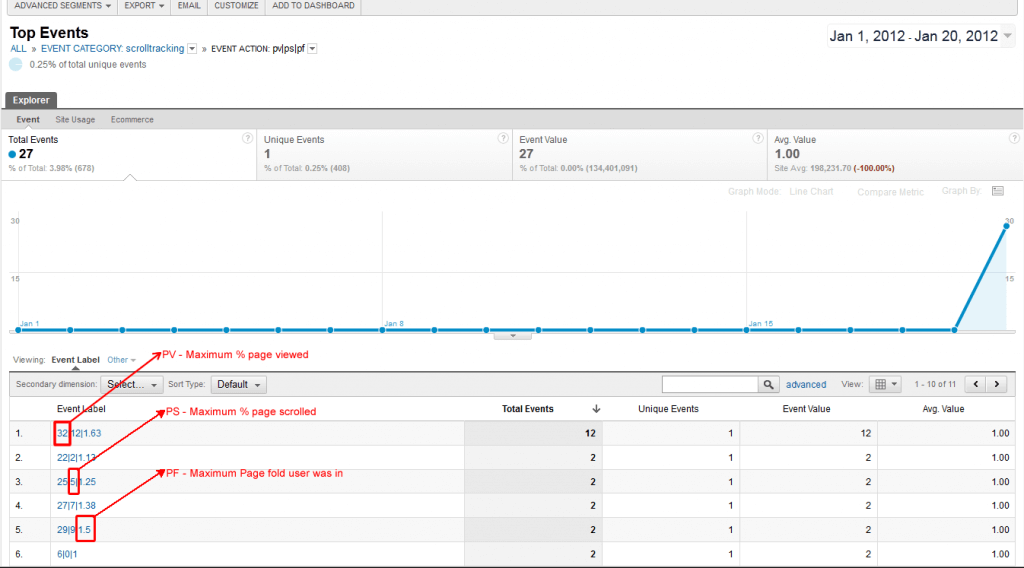
Scrolltracking.js would attach a function to scroll changes on the document. So whenever the user scrolls down it’ll collect the following values as “pv|ps|pf” with a non-interactive flag.
- pv – maximum % page viewed by the user.
- ps – maximum % page scrolled by user.
- pf – maximum page fold user viewed.
Here all the values measured and tracked in GA would be the maximum value of %page viewed, %page scrolled and page fold user was in. So we can identify how much content is viewed by users on a given page. If a user lands to page and goes to another page without scrolling. It’ll track default values “X|0|1” in GA where “X” is % page viewed (user viewed some portion) and 0% page scroll and 1 as page fold.
Note:
- This script works with jQuery versions greater than 1.3.2 and tested with Chrome, firefox, internet explorer 8
- You can exclude information if you don’t want to track any of the values pv (% page viewed), ps (% page scrolled), or pf (page fold) – You’ll need to update the script.